In Kubernetes, applications running in pods are ephemeral by nature. If a pod crashes or is rescheduled, any data stored inside the pod’s container filesystem is lost.
While this design works well for stateless workloads, many enterprise applications need persistent storage for stateful data. This makes volume management a critical topic in Kubernetes.
This article explores volume management concepts in Kubernetes, then connects those principles to AKS and Azure storage offerings with detailed explanations and examples.
Ephemeral Volumes
Ephemeral volumes exist only as long as the pod exists. Once the pod is deleted, these volumes and their data are gone.
Types of ephemeral volumes include:
-
- emptyDir: Created when a pod is assigned to a node, and exists as long as the pod runs. Useful for temporary storage like caches and logs.
- configMap and secret: Used to inject configuration or sensitive data.
- downwardAPI: Exposes pod metadata.
- ephemeral volume type (generic ephemeral volumes): Introduced in Kubernetes 1.19+ to allow more flexible ephemeral volume handling.
Drawbacks:
-
- Non-persistent: Data lost if pod restarts or moves.
- Not suitable for production stateful workloads.
- Best for temporary data, caches, or logs.
From here onward, we’ll focus only on Persistent Volumes — as they form the backbone of any stateful or production-grade workload in Kubernetes. All the upcoming sections are related to Persistent Volumes management in Kubernetes & AKS.
Persistent Volumes (PV)
To overcome the ephemeral nature of pods, Kubernetes introduced Persistent Volumes (PV) and Persistent Volume Claims (PVC). These resources work together to enable pods to use durable, reliable storage that outlives pod lifecycles.
Persistent Volume (PV)
In Kubernetes, cloud storage resources like Azure Disks or Azure File Shares cannot be directly managed or consumed by pods. Kubernetes needs an internal representation that acts as a bridge between the cluster and the underlying cloud volume. This is where the Persistent Volume (PV) comes in.
A Persistent Volume (PV) is a Kubernetes object that represents a piece of storage within the cluster. It is either provisioned manually by a cluster administrator (static provisioning) or automatically by Kubernetes using a StorageClass (dynamic provisioning).
A PV abstracts the underlying storage backend—whether it’s a disk, file share, or network volume—and exists independently of the lifecycle of any particular pod.
Key points:
-
- PV abstracts the underlying physical storage.
- Lifecycle is independent from pods.
- Can be pre-created statically or dynamically created when a PVC requests storage.
Persistent Volume Claim (PVC)
A Persistent Volume Claim (PVC) is a request for storage made by a user or a pod.
It defines the desired size, access mode, and optionally the storage class. Kubernetes uses this claim to find a suitable Persistent Volume (PV) that meets the requested criteria.
If no matching PV exists, and if a StorageClass is specified, Kubernetes will attempt to dynamically provision one. Once bound, the PVC can be used by one or more pods to mount the underlying storage in a standardized and declarative way.
Key points:
-
- PVC automatically binds to a matching PV (if available).
- If no PV exists, dynamic provisioning will create one if StorageClass is defined.
- Pods use PVCs to request and use storage in a declarative manner.
Static vs Dynamic Provisioning
Kubernetes supports two approaches to binding storage:
Static Provisioning
In static provisioning, the Persistent Volume (PV) is manually created in advance by a Kubernetes administrator. It references an existing, manually provisioned storage resource—such as an Azure Disk—that has already been created outside of Kubernetes.
This method gives the administrator full control over which storage resource is used and is often preferred in tightly controlled environments where volumes are provisioned manually for compliance, security, or operational reasons.
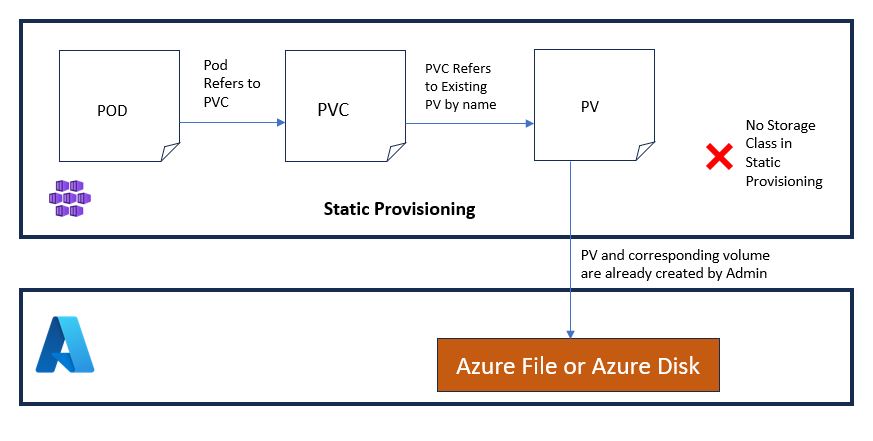
Step-by-Step Flow
Step 1 – Admin Creates the Persistent Volume (PV)
The admin manually provisions the underlying storage (e.g., Azure Disk), then creates a PV in Kubernetes that represents this storage.
Step 2 – User/Application Creates a Persistent Volume Claim (PVC)
The PVC should specify:
-
-
- Access mode (e.g., ReadWriteOnce)
- Requested storage size
volumeNamefield matching the pre-created PV
-
This tells Kubernetes to bind the claim directly to the specified PV.
Step 3 – Kubernetes Binds the PVC to the PV
Kubernetes detects that the PVC is targeting an existing PV and binds them directly. You can verify the binding via kubectl get pvc.
Step 4 – Pod Mounts the Volume via PVC
A pod can now reference the PVC in its volumes section, and containers mount it via volumeMounts.
Step 5 – Post-deletion behavior depends on reclaimPolicy
If set to Retain, the underlying disk and PV remain intact after PVC deletion. If set to Delete, Kubernetes deletes the associated cloud disk.
Example YAML for Static Provisioning
Persistent Volume (PV):
apiVersion: v1
kind: PersistentVolume
metadata:
  name: static-pv
spec:
  capacity:
    storage: 10Gi
  accessModes:
    - ReadWriteOnce
  azureDisk:
    diskName: my-disk
    diskURI: /subscriptions/.../resourceGroups/.../providers/Microsoft.Compute/disks/my-disk
  persistentVolumeReclaimPolicy: Retain
-
azureDisk.diskURI: Points to an existing Azure Disk.persistentVolumeReclaimPolicy: Retain: Ensures the disk is not deleted automatically.
Persistent Volume Claim (PVC):
apiVersion: v1
kind: PersistentVolumeClaim
metadata:
  name: static-pvc
spec:
  accessModes:
    - ReadWriteOnce
  resources:
    requests:
      storage: 10Gi
  volumeName: static-pv
volumeName: This explicitly tells Kubernetes to bind the PVC to a specific, pre-created Persistent Volume (PV) by name.- Unlike dynamic provisioning—where the PV is created automatically based on StorageClass—static provisioning requires the volume to exist ahead of time.
- By setting
volumeName, Kubernetes skips its usual matching process and directly links the PVC to the named PV. - This approach is especially useful when the underlying storage (e.g., an Azure disk) has already been provisioned and must be used as-is, ensuring precise control over what storage gets mounted.
Pod Referencing the PVC:
apiVersion: v1
kind: Pod
metadata:
  name: static-pod
spec:
  volumes:
  - name: app-volume
    persistentVolumeClaim:
      claimName: static-pvc
  containers:
  - name: app-container
    image: nginx
    volumeMounts:
    - name: app-volume
      mountPath: /mnt/data
- This mounts the Azure Disk into the container at
/mnt/data.
B) Dynamic Provisioning
Dynamic provisioning simplifies storage management by allowing Kubernetes to automatically create Persistent Volumes (PVs) on demand. When a user or pod creates a PVC and references a StorageClass, Kubernetes uses the defined provisioner and parameters in that StorageClass to dynamically provision the underlying storage resource (e.g., an Azure File Share) and automatically bind it to the PVC.
This is the recommended approach for most production environments as it eliminates manual steps and improves automation, scalability, and consistency.
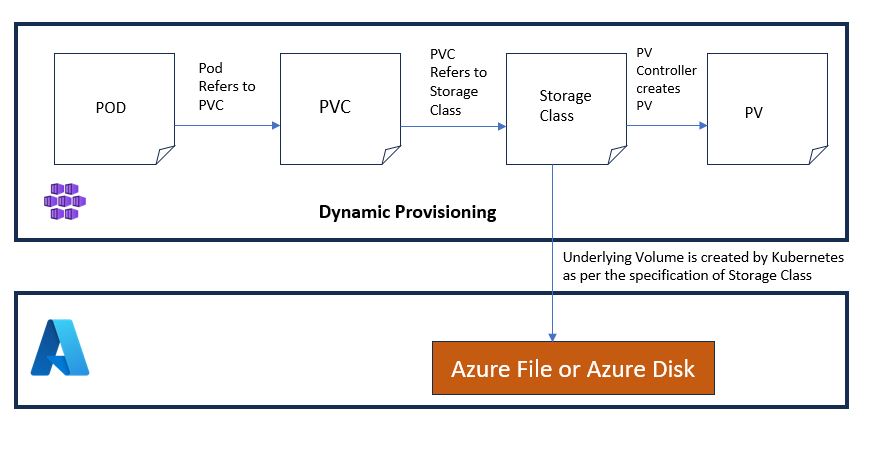
Step-by-Step Flow
Step 1: StorageClass Definition
A Kubernetes administrator defines a StorageClass, which acts as a template for provisioning volumes.
It includes:
-
- Provisioner (e.g., Azure Files CSI)
- Performance tier (e.g., Standard_LRS)
- Optional fields like reclaimPolicy, volumeBindingMode, and storageAccount
The volumeBindingMode determines when the volume is created — immediately on PVC creation or only when a pod is scheduled.
Step 2: PVC Creation
An application team creates a PersistentVolumeClaim (PVC) referring to the StorageClass.
The PVC defines:
-
- Required storage size
- Access mode (ReadWriteOnce, ReadWriteMany, etc.)
- The storageClassName
PVCs are usually created in consultation with the platform team to align with available storage classes and operational policies.
Step 3: Volume Provisioning
After the PVC is submitted, Kubernetes decides when to provision the actual storage:
-
- If volumeBindingMode is Immediate: the PersistentVolume (PV) and cloud resource are created right away.
- If volumeBindingMode is WaitForFirstConsumer: provisioning is delayed until a pod requests the volume.
Using WaitForFirstConsumer ensures storage is created in the same zone as the pod, which is essential for zonal clusters or zonal disk SKUs.
Step 4: Storage Account Handling
Kubernetes decides which Azure Storage Account to use for provisioning:
-
- If storageAccount is defined in the StorageClass: that specific account is used.
- If not defined: Kubernetes creates a new random-named storage account in the node resource group.
Random storage account creation is not recommended in production. It lacks traceability, control, and naming consistency. The managed identity (usually Kubelet’s) must have at least Contributor role on the target storage account.
Step 5: Pod Creation and Volume Mounting
When a pod that references the PVC is created:
-
- Kubernetes attaches the volume to the node.
- The volume is then mounted into the pod at the specified mountPath.
- The same volume can be mounted to multiple containers in the pod if needed.
The volume must first be declared at the pod level (
volumes: section), and only then referenced within each container’s volumeMounts: block.Example StorageClass for Azure Files (Dynamic Provisioning):
apiVersion: storage.k8s.io/v1
kind: StorageClass
metadata:
  name: azurefile-sc
provisioner: file.csi.azure.com
parameters:
  skuName: Standard_LRS
  storageAccount: mystorageaccount  # Optional but recommended for production
reclaimPolicy: Retain
volumeBindingMode: WaitForFirstConsumer
-
- provisioner:
Defines which driver or plugin will be used to provision the volume.
Common options:-
file.csi.azure.com: Azure Files CSI driverdisk.csi.azure.com: Azure Disks CSI driverkubernetes.io/azure-disk: Deprecated in-tree Azure Disk driverkubernetes.io/azure-file: Deprecated in-tree Azure File driver
-
- provisioner:
Recommendation: Use CSI drivers (*.csi.azure.com) as they are the future of Kubernetes storage.
-
- parameters.skuName:
Specifies the Azure storage performance tier.
Common options:Standard_LRS: Locally redundant standard storage (default, cost-effective)Premium_LRS: Locally redundant premium SSD (faster IOPS)Standard_ZRS: Zone-redundant storage (available in some regions)
- parameters.skuName:
Note: Available options depend on whether you’re using Azure Disks or Azure Files.
-
- parameters.storageAccount:
Optional field. If specified, Kubernetes uses this exact Azure Storage Account to create the disk or file share.
If omitted, Kubernetes creates a random storage account in the node resource group, which is not recommended for production.
This parameter is mostly used with Azure Files (not Azure Disks).
- parameters.storageAccount:
-
- reclaimPolicy:
Defines what happens to the volume when the PVC is deleted.
Options:Retain: Volume and data are preserved. Manual cleanup needed. ✅ Recommended for production.Delete: Volume is deleted automatically with the PVC. ⚠️ May lead to data loss if not careful.Recycle: Deprecated. Used to scrub and reuse volumes (not supported in CSI).
- reclaimPolicy:
-
- volumeBindingMode:
Controls when volume binding and provisioning occur.
Options:Immediate: Volume is created and bound as soon as the PVC is created. May cause zone mismatch issues in multi-zone clusters.WaitForFirstConsumer: Volume is created only when a pod using the PVC is scheduled. ✅ Recommended for production (especially in multi-AZ setups).
- volumeBindingMode:
Note: For dynamic provisioning with Azure Files, you do not need to specify the resource group name in the StorageClass. Kubernetes will search for the storage account
mystorageaccountwithin the same subscription and region as the AKS cluster.Ensure that the node pool managed identity (Kubelet identity) has at least
Contributorrole on the storage account or its resource group, especially if the account is in a separate resource group.
Important: For production workloads, always set
reclaimPolicytoRetain.This ensures that the underlying Azure storage (e.g., file share or disk) is not automatically deleted if the PVC is removed. Accidental deletions of PVCs can lead to permanent data loss if the policy is set to
Delete.If the built-in Azure StorageClasses (like
azurefileormanaged-csi) do not useRetain, create a custom StorageClass with identical parameters and explicitly setreclaimPolicy: Retain.
Example PVC Using the Above StorageClass:
apiVersion: v1
kind: PersistentVolumeClaim
metadata:
  name: azurefile-pvc
spec:
  accessModes:
    - ReadWriteMany
  storageClassName: azurefile-sc
  resources:
    requests:
      storage: 5Gi
-
- accessModes:
ReadWriteOnce(RWO): Mounted as read-write by a single node.ReadOnlyMany(ROX): Mounted as read-only by multiple nodes. This requires Azure Files (see ‘Azure Storage Classes in AKS’ section).”ReadWriteMany(RWX): Mounted as read-write by multiple nodes (supported by Azure Files, not Azure Disks).
- accessModes:
-
- storageClassName: References the StorageClass to initiate dynamic provisioning.
-
- resources.requests.storage: Defines the required volume size.
Once the pod that uses this PVC is scheduled, Kubernetes provisions an Azure File Share, attaches it to the node, and mounts it into the pod at the path defined in the pod’s YAML.
Mounting the Volumes in Pods
Before a volume can be accessed by a container, it must first be mounted at the Pod level using the volumes section of the pod specification. Then, inside each container, the volume can be made accessible by referencing the same volume name under volumeMounts.
This separation ensures that the volume is declared once for the pod, and then selectively mounted into one or more containers as needed.
Example Pod YAML
apiVersion: v1
kind: Pod
metadata:
  name: my-pod
spec:
  volumes:
  - name: my-storage
    persistentVolumeClaim:
      claimName: my-pvc
  containers:
  - name: my-container
    image: nginx
    volumeMounts:
    - mountPath: "/mnt/data"
      name: my-storage
-
- volumes: Declares volume via PVC.
- volumeMounts: Specifies mount path inside the container.
Mounting Across Multiple Containers
containers:
- name: app1
  image: nginx
  volumeMounts:
  - mountPath: "/mnt/data"
    name: shared-storage
- name: app2
  image: busybox
  volumeMounts:
  - mountPath: "/mnt/data"
    name: shared-storage
This setup allows multiple containers in the same pod to share a volume.
Volume Binding
When a PVC (PersistentVolumeClaim) is created, Kubernetes attempts to bind it to an appropriate Persistent Volume (PV) that satisfies the requested size, access mode, and StorageClass. This process is called volume binding.
There are two main binding statuses (Can be seen when you run kubectl get pvc)
-
-
- Bound: The PVC has successfully been matched and attached to a PV.
- Pending: The PVC is waiting to be bound, and something is preventing successful provisioning or binding.
-
If the binding status is pending, The command kubectl describe pvc <pvcname> would help you to understand and troubleshoot the possible issue.
Common reasons for PVC stuck in Pending:
-
-
-
Missing or incorrect StorageClass: The
storageClassNameprovided in the PVC doesn’t match any existing StorageClass, or the StorageClass has invalid parameters. - Insufficient permissions: The node pool managed identity (Kubelet identity) may not have the required
Contributorrole on the storage account or its resource group. - Azure quota limits: The subscription may have exhausted the quota for disks, file shares, or storage accounts in the selected region.
-
VolumeBindingMode mismatch: If
WaitForFirstConsumeris set but no pod is yet scheduled that uses the PVC, volume provisioning will be delayed intentionally.
-
-
Azure Storage Classes in AKS
-
-
- Azure Disk: Supports ReadWriteOnce. Best for single-writer workloads like databases.
- Azure Files: Supports ReadWriteMany. Ideal for shared volumes across multiple pods.
- Azure NetApp Files: Enterprise-grade option for advanced, high-performance needs.
-
Use CSI drivers such as disk.csi.azure.com and file.csi.azure.com for the latest features and best practices.
Managed Identities and Access
Kubernetes uses Azure Managed Identities to authenticate and authorize requests when interacting with Azure storage backends (Disk or File).
🔹 Purpose vs Identity Used
| Purpose | Managed Identity Used |
|---|---|
| Provisioning Azure Disk or File share | Node pool managed identity (Kubelet) |
| Accessing static pre-created volumes | Cluster or node pool managed identity |
-
-
The node pool managed identity (often referred to as the Kubelet identity) is automatically used during dynamic provisioning.
-
For static volumes (e.g., manually created Azure Disks or File Shares), the cluster or node pool identity must have read/write access.
-
🔹 Required Role Assignments
| Scenario | Minimum Required Role |
|---|---|
| Provisioning Azure Disks or Files | Contributor on the target resource group or storage account |
| Accessing Azure Files with private endpoint | Storage File Data SMB Share Contributor (additional) |
If you use your own pre-created storage account, make sure the correct identity (usually the Kubelet identity) has the necessary permissions assigned. This is especially critical in production environments to avoid volume provisioning or mounting failures.
Relationship Between PVs and AKS Worker Nodes
In Kubernetes, a Persistent Volume (PV) must first be attached and mounted to a worker node before it becomes accessible to the pod scheduled on that node.
How it works:
-
- When a pod uses a PVC, Kubernetes identifies the node the pod is scheduled on.
- The underlying storage (disk or file share) is then mounted to that node.
- Only after this, the volume is mounted inside the pod via the path defined in
volumeMounts. - This entire process is transparent to the user and handled automatically by Kubernetes and the CSI driver.
Impact of Access Modes
-
- ReadWriteOnce (RWO) — typically used with Azure Disks: The disk can be attached to only one node at a time. If a pod using the PVC is rescheduled to a different node, the disk must be detached from the old node andattached to the new one. This can introduce a short delay.
-
- ReadWriteMany (RWX) — supported by Azure Files: The file share can be mounted by multiple nodes simultaneously. Pods across different nodes can read/write concurrently without detaching or remounting.
What Happens During AKS Node Autoscaling?
When AKS autoscaling adds new nodes, existing PVs are not automatically pre-mounted to those nodes.
However, if a pod requiring a PVC is scheduled on a new node:
-
- For Azure Disks (RWO): The disk is detached from the previous node (if attached) and reattached to the new one.
- For Azure Files (RWX): The new node simply mounts the same file share without affecting others.
This dynamic mounting behavior is managed by the CSI drivers and Kubernetes controller logic without manual intervention, provided that identity permissions and quota limits are properly configured.
Backing up Persistent Volumes
Kubernetes does not natively manage or orchestrate backups of persistent volumes. Since volumes are typically backed by cloud-managed resources (such as Azure Disks or Azure Files), it is essential to implement backup at the cloud provider level to meet RTO/RPO and data protection goals.
Recommended Azure-native backup strategies:
-
-
Azure Backup for Managed Disks: Provides automated, incremental backups of Azure-managed disks. Supports policy-based retention, vault-level access controls, and restore-as-new-disk capabilities.
-
Azure Files Backup via Recovery Services Vault: Enables file-level backup for Azure Files with capabilities like daily snapshots, long-term retention, and point-in-time restore.
-
🟦 Tip: Always align your backup policy with organizational compliance standards and application-level recovery requirements.
⚠️ Note: If the reclaimPolicy is set to
Deleteand the PVC is deleted without proper backup, the data may be irreversibly lost. Always ensure a backup is in place before deletion or migration activities.
Expanding Persistent Volumes
There may be situations where your application needs more storage than originally requested. If supported by the underlying storage class and volume type, PVCs can be resized without having to delete and recreate the volume.
Pre-requisites:
-
- The
StorageClassused must haveallowVolumeExpansion: true(if it’s a custom StorageClass). - The volume plugin (e.g., Azure Disk or Azure Files CSI driver) must support resizing.
- The
PVCmust be in aBoundstate.
- The
How to Expand a PVC:
You can increase the storage size by modifying the PVC definition:
apiVersion: v1
kind: PersistentVolumeClaim
metadata:
  name: my-pvc
spec:
  accessModes:
    - ReadWriteOnce
  storageClassName: managed-premium
  resources:
    requests:
      storage: 20Gi  # Increased from 10Gi
Note: A pod restart may be required for the expanded volume to be recognized, especially for Azure Disk.
Important Considerations:
-
- Volume shrinking (reducing size) is not supported.
- If resizing does not take effect, ensure that your CSI driver and Kubernetes version support this feature.
- Some applications may need additional steps to detect the resized volume (e.g., resizing file systems inside the container).
Using Azure NetApp Files as Persistent Volumes in AKS
Azure NetApp Files (ANF) provides ultra-low latency, high-throughput file storage, ideal for workloads like SAP, databases, and large-scale enterprise applications.
Kubernetes supports ANF through the NFS CSI driver, which can be used to mount NetApp volumes as Persistent Volumes (PVs) in AKS.
Key Features
-
- Supports ReadWriteMany (RWX), ReadOnlyMany, and ReadWriteOnce
- Backed by NFS v4.1 protocol
- Offers multiple performance tiers (Standard, Premium, Ultra)
- Enterprise-grade SLA and throughput
- Requires delegated subnet and capacity pool setup in advance
Prerequisites
-
- ANF enabled in your subscription
- A delegated subnet in your VNet for ANF
- A capacity pool and volume created in Azure NetApp Files
- Install and configure the NetApp NFS CSI driver in your AKS cluster
Sample PV and PVC for Azure NetApp Files
# PersistentVolume
apiVersion: v1
kind: PersistentVolume
metadata:
  name: anf-pv
spec:
  capacity:
    storage: 100Gi
  accessModes:
    - ReadWriteMany
  persistentVolumeReclaimPolicy: Retain
  csi:
    driver: nfs.csi.k8s.io
    volumeHandle: <netapp-volume-resource-id>
    volumeAttributes:
      server: <netapp-fileserver-ip>
      share: /
  storageClassName: anf-nfs
# PersistentVolumeClaim
apiVersion: v1
kind: PersistentVolumeClaim
metadata:
  name: anf-pvc
spec:
  accessModes:
    - ReadWriteMany
  resources:
    requests:
      storage: 100Gi
  storageClassName: anf-nfs
  volumeName: anf-pv
Important Notes:
-
volumeHandlemust be the full Azure resource ID of the NetApp volume.serverrefers to the ANF volume mount IP.- This is a form of static provisioning, where the NetApp volume is pre-created and directly referenced.
- You must configure networking and access correctly — ensure the AKS cluster can reach the ANF subnet.
Dynamic provisioning with NetApp is supported via the ANF CSI driver, but it requires creating a custom StorageClass and provisioning configurations aligned with your NetApp volume pools.
Conclusion
Volume management in AKS blends Kubernetes native capabilities with Azure’s enterprise-grade storage. To run production workloads:
-
- Use predefined Storage Accounts in Production scenario.
- Prefer
Retainreclaim policy for critical data. - Assign correct RBAC roles to Managed Identities.
- Enable backups externally using Azure-native services.
- Monitor for PVC binding issues and resize requirements.
By following these guidelines, you ensure resilience and scalability for your stateful applications running on AKS.

