There are many techies who would like to start their journey on Kubernetes, but they are not sure from where they should begin. So I have made an attempt to jot down all the common questions and their answers related to Kubernetes.
This article is vendor neutral and focuses purely on raw Kubernetes and its core concepts — without tying it to any specific cloud provider or platform.
Whether you are a Kubernetes beginner, preparing for an interview, or just trying to refresh your Kubernetes knowledge, this article is for you.
Section 1 : Kubernetes Basics
Q1: What is Kubernetes?
Kubernetes is an open-source container orchestration platform that automates the deployment, scaling, and operation of application containers. It was originally developed by Google based on their experience with Borg and is now maintained by the Cloud Native Computing Foundation (CNCF).
Q2: Why was Kubernetes developed?
Kubernetes was developed to help manage large-scale containerized applications with built-in automation for deployment, scaling, and recovery. It addresses operational complexity and promotes immutable, declarative infrastructure patterns.
To read the story behind Kubernetes development and it’s market adaptation, read my article: The Kubernetes Story
Q3: Who originally developed Kubernetes and who owns it now?
Google originally developed Kubernetes. It is now an open-source project under the governance of the CNCF (Cloud Native Computing Foundation), with contributions from thousands of individuals and organizations.
Q4: Is Kubernetes open-source?
Yes, Kubernetes is fully open-source and is hosted on GitHub under the Apache 2.0 license.
Q5: What is the Kubernetes Control Plane?
The control plane is the brain of a Kubernetes cluster. It makes global decisions (like scheduling) and detects/responds to cluster events. Components include API server, etcd, scheduler, controller manager, and cloud controller manager.
Q6: What are Worker Nodes in Kubernetes?
Worker nodes run the actual application workloads in containers. Each node runs a kubelet (agent), a container runtime (like containerd), and a kube-proxy to manage networking rules.
Q7: What is a Pod?
A Pod is the smallest deployable unit in Kubernetes. It encapsulates one or more containers, shared storage volumes, and network IPs. All containers in a Pod share the same network namespace.
Q8: Why does Kubernetes use Pods instead of managing containers directly?
Pods provide an abstraction that allows multiple tightly-coupled containers to share networking and storage. This makes it easier to manage helper containers like log shippers or sidecars. It also simplifies lifecycle and orchestration.
Q9: Can we conceptually treat each Pod as a separate computer?
Yes. Each Pod gets its own IP address and behaves like a standalone host on the network. Applications can assume it’s the only process on that machine, which helps with legacy app compatibility.
Q10: In which language is Kubernetes developed?
Kubernetes is written in Go (Golang).
Q11: What is kubectl?
kubectl is the command-line tool used to interact with the Kubernetes API server. It allows users to create, inspect, update, and delete Kubernetes resources.
Q12: Where should kubectl be installed?
kubectl should be installed on the machine from which you’re managing the cluster — this could be your laptop, a jumpbox, or a CI/CD agent. It must have access to the kubeconfig file to authenticate against the cluster.
Q13: What will be the impact if the Kubernetes API Server is down?
If the API Server is down, you won’t be able to perform any kubectl operations, deploy new workloads, or manage the cluster. However, the existing workloads will continue running since kubelet and container runtime operate independently on nodes.
Some cluster operations (e.g., scaling, self-healing) may also be affected if controllers cannot communicate with the API server.
Q14: How to connect to Kubernetes and troubleshoot if API Server is down?
You’ll need to SSH into the master/control plane node and check logs of the API server. Common troubleshooting steps include checking etcd status, disk pressure, certificate validity, and kubelet status. You may also want to look at systemd or container logs if API server runs as a static Pod.
Section 2 : Kubernetes Architecture
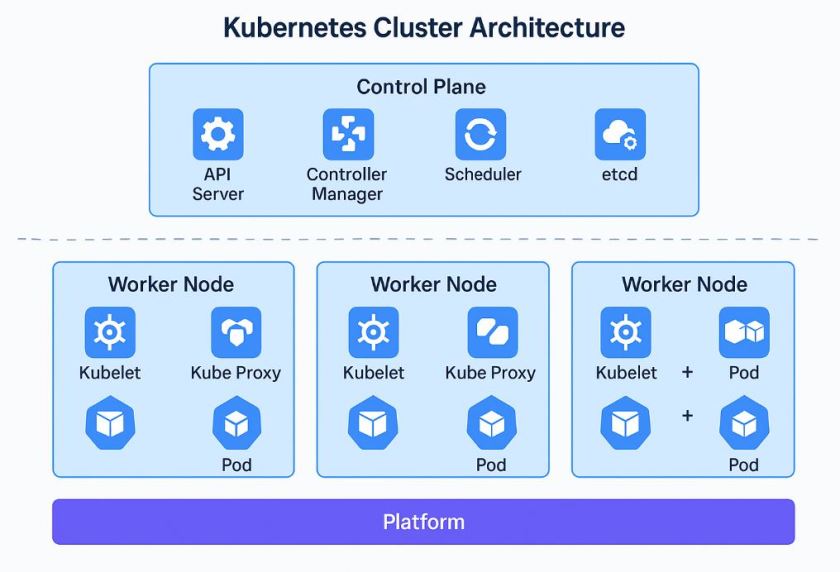
Q1: What is the architecture of a Kubernetes cluster?
Kubernetes follows a master-worker architecture. It consists of a Control Plane (or Master Plane) that manages the overall cluster, and multiple Worker Nodes where application workloads run. This architecture supports scale, high availability, and decoupled control logic.
Q2: What components are part of the Kubernetes Control Plane?
The Control Plane consists of several critical components:
-
- kube-apiserver: The front-end API server that validates and processes REST requests.
- etcd: A highly available, distributed key-value store used for all cluster data and state.
- kube-scheduler: watches for unscheduled Pods and makes placement decisions based on resource availability and scheduling policies. It selects an appropriate Node and records this decision by updating the Pod specification, but it does not execute the assignment itself.
- kube-controller-manager: Runs controllers to maintain cluster state (e.g., Deployment, Node, Endpoint).
- cloud-controller-manager: Integrates with cloud provider APIs to manage resources like load balancers and volumes.
Q3: What is the role of the kube-apiserver?
The kube-apiserver is the only component that interacts with the Kubernetes cluster via REST. It authenticates, validates, and serves all API calls from `kubectl`, controllers, and operators. It’s stateless and typically runs behind a load balancer in HA setups.
Q4: What is etcd, and why is it important?
etcd is a distributed key-value store that stores all cluster configuration and state. It is the single source of truth for Kubernetes. Without etcd, the Control Plane cannot function. Backing up etcd is critical for disaster recovery.
Q5: What is the kube-scheduler responsible for?
The kube-scheduler monitors for unscheduled Pods and decides the best node for placement. It evaluates node resource availability, taints/tolerations, affinity/anti-affinity rules, and custom scheduling constraints.
Q6: What does the kube-controller-manager do?
This component runs various controllers such as:
-
- Deployment Controller: Ensures desired replicas are running.
- Node Controller: Tracks node health and availability.
- Job Controller: Tracks completion of batch jobs.
Each controller is a loop that compares desired state with actual state and performs actions to reconcile them.
Controllers like the Deployment or ReplicaSet controller are part of kube-controller-manager.
Q7: What is the cloud-controller-manager?
The cloud-controller-manager abstracts cloud-provider-specific logic (e.g., for node provisioning, persistent disks, load balancers). It enables Kubernetes to work seamlessly across different IaaS platforms like Azure, AWS, and GCP.
Cloud-controller-manager is only required if the Kubernetes Cluster is running in a Cloud environment.
Q8: What are the components of a Kubernetes Worker Node?
Each Worker Node includes:
-
- kubelet: Node agent that ensures Pods are running as expected based on PodSpecs.
- container runtime: Responsible for running containers (e.g., containerd, CRI-O, Docker – deprecated).
- kube-proxy: Handles networking rules and load balances traffic to Pods based on Service rules.
Q9: What is the kubelet and how does it work?
kubelet runs on each node and ensures the containers in assigned Pods are running. It talks to the container runtime, reads the PodSpecs, monitors liveness/readiness probes, and reports back to the API server.
Q10: What is kube-proxy and what is its role?
kube-proxy manages network rules on nodes using iptables or IPVS. It enables communication between services and their backend Pods by load-balancing traffic at the IP level.
Q11: How do Control Plane and Worker Nodes interact?
The Control Plane schedules workloads onto Worker Nodes and monitors their health. Worker Nodes execute the workloads, report status, and react to commands (e.g., scale up/down). Communication is via the API server.
Q12: Is it possible to run a Kubernetes cluster on a single machine?
Yes, this is commonly done in local dev environments using tools like minikube, kind, or k3s. In these setups, control plane and worker components run on a single node.
Q13: How is high availability (HA) achieved in Kubernetes?
HA is achieved by deploying multiple Control Plane nodes with etcd in a quorum. Load balancers are used in front of kube-apiservers. Worker Nodes also run across availability zones to tolerate infrastructure failures.
Q14: What is the platform layer in Kubernetes?
This layer seats outside the Kubernetes Cluster.
The platform layer refers to the underlying infrastructure and cloud-native services that support the cluster. This includes:
-
- Compute (VMs or Bare Metal)
- Networking (VPC, IPAM, Load Balancers)
- Storage (disks, file shares, CSI)
- Security (IAM, policies, secrets)
When Kubernetes is deployed in the cloud, this platform layer is often managed by the cloud provider (e.g., AKS, EKS, GKE), simplifying operations and maintenance.
Section 3 : Pods & Containers
Q1: What is the relationship between Pods and Containers?
A Pod can run one or more containers that share the same network and storage context. Kubernetes doesn’t run containers directly—it runs Pods. So even if your application has only one container, Kubernetes wraps it in a Pod.
Q2: What is a Sidecar Container?
A Sidecar is a secondary container in a Pod that helps or enhances the functionality of the main application container. Real-life use cases include log shippers (like fluentbit), service mesh proxies (like Envoy in Istio), or configuration watchers.
Q3: What is an Init Container?
An Init Container is a special container that runs before the main application containers start. Use cases include waiting for an external service to be ready, copying secrets from a shared volume, or checking application prerequisites.
Q4: How does one Pod connect to another Pod?
Pods can connect to other Pods using the ClusterIP DNS provided by Kubernetes Services. While Pods do have IPs, these are ephemeral. DNS-based communication is preferred for stability and load balancing.
Q5: Are Pods registered in Kubernetes DNS?
Pods themselves are not registered by default. However, Services are registered, and headless services can expose individual Pod DNS records, especially useful for StatefulSets where pod identity matters.
Section 4 : Pods – Advanced Configurations
🔍 Health Probes in Kubernetes
Q6: How does Kubernetes know whether a Pod is healthy and ready to serve traffic?
Kubernetes uses probes to monitor the health and readiness of containers. There are three types:
-
- Liveness Probes – Check if the app is still running. If it fails repeatedly, the container is restarted.
- Readiness Probes – Check if the app is ready to accept traffic. If it fails, the Pod is removed from Service endpoints.
- Startup Probes – Check if the app has finished starting before enabling liveness/readiness checks.
These can be configured using HTTP, TCP, or Exec handlers inside the Pod spec.
Q7: What is a Liveness Probe and when should you use it?
A Liveness Probe detects whether a container is running as expected. If the check fails, the container is restarted automatically.
Use Case: Suitable for long-running applications that may hang without crashing, like JVM-based apps or APIs under load.
Q8: What is a Readiness Probe and when is it useful?
A Readiness Probe determines if the app is ready to serve traffic. If the probe fails, the Pod is temporarily removed from the load balancer’s endpoints.
Use Case: Apps that take time to initialize, load configuration, or establish database connections.
Q9: What is a Startup Probe and why was it introduced?
A Startup Probe is used for apps that take a long time to start. It disables the Liveness and Readiness checks until the startup check passes.
Use Case: Prevents premature restarts of slow-starting apps like monoliths or large microservices during boot time.
Q10: What types of probe handlers are supported in Kubernetes?
Kubernetes supports three probe types:
-
- HTTP GET – Makes an HTTP request to a path/port in the container.
- TCP Socket – Opens a TCP connection to check port availability.
- Exec – Runs a command inside the container; success/failure based on exit code.
Choose based on what the app can expose — web endpoints, open ports, or internal shell commands.
Q11: What happens if a liveness or readiness probe is misconfigured in Kubernetes?
A misconfigured probe can cause serious issues.
If a readiness probe always fails, Kubernetes will remove the Pod from the Service endpoints, making it unreachable—even if it’s working fine.
If a liveness probe fails repeatedly, Kubernetes will kill and restart the Pod, potentially triggering a crash loop. Common misconfigurations include wrong paths, ports, response codes, or timeouts.
Always test probe settings carefully in dev before applying to production.
Note: To get a detailed insight on Kubernetes Health Probe, read my article: Exploring Kubernetes Health Probe
📊 Resource Limits & Metrics
Q11: What are resource requests and limits in Kubernetes?
Requests define the minimum resources a container needs to run. Limits define the maximum it is allowed to consume.
Kubernetes uses these values to make scheduling decisions, ensure fair resource usage, and prevent one Pod from starving others.
Q12: Why are resource limits important in a production environment?
Without limits, a Pod could consume excessive CPU or memory, affecting neighboring Pods. Limits:
-
- Prevent noisy neighbor issues
- Enable resource isolation and fair usage
- Support autoscaling and capacity planning
They are critical for maintaining application stability and node health.
Q13: What happens if a container exceeds its memory or CPU limit?
If a container exceeds:
-
- Memory limit: It is terminated by the OS (OOMKilled), and restarted by Kubernetes.
- CPU limit: It is throttled — the container continues to run but gets fewer CPU cycles.
Properly setting limits helps prevent crashes and performance issues.
Q14: Who collects CPU and memory usage data in Kubernetes?
The metrics-server collects resource usage data from all nodes and makes it available to the API server. It powers:
-
- The
kubectl topcommand - Horizontal Pod Autoscaler (HPA)
- Dashboards like Lens or Kubernetes Dashboard
- The
It’s lightweight and does not persist historical data.
Section 5 : Controller Objects in Kubernetes
🧠 Kubernetes Controller Objects
Q1: What is a controller object in Kubernetes?
A controller in Kubernetes is a control loop that watches the state of your cluster and makes changes to reach the desired state. It ensures that the declared state in your manifests (like the number of Pods or their configurations) matches the actual running state.
Q2: How many controller objects are there in Kubernetes?
There are several built-in controller objects, including:
-
- Deployment – Manages stateless applications with ReplicaSets underneath.
- ReplicaSet – Ensures a specific number of identical Pods are running.
- StatefulSet – Manages stateful applications requiring stable identity and storage.
- DaemonSet – Ensures one Pod runs on every (or specific) node.
- Job & CronJob – Run batch or scheduled workloads.
📦 Deployments & ReplicaSets
Q3: What is a Deployment in Kubernetes?
A Deployment is a higher-level abstraction in Kubernetes that manages ReplicaSets and provides declarative updates to Pods. It allows you to define the desired state of your application (number of replicas, container image, labels, etc.) and ensures that the current state matches it through rolling updates and rollbacks.
Q4: What is the role of a ReplicaSet?
A ReplicaSet ensures that a specified number of identical Pods are running at any given time. It continuously monitors the cluster and spins up new Pods if any go down, ensuring availability. Deployments manage ReplicaSets under the hood to enable versioned updates.
Q5: How does a Deployment use a ReplicaSet internally?
When you create or update a Deployment, it creates a new ReplicaSet with the new Pod template. Kubernetes scales down the old ReplicaSet and scales up the new one as part of a rolling update. If you rollback, Kubernetes adjusts the ReplicaSets accordingly.
Q6: What happens when you update a Deployment?
Kubernetes performs a rolling update. It gradually creates new Pods using the new configuration and removes the old ones, ensuring that a minimum number of Pods remain available during the transition. This minimizes downtime during updates.
kubectl rollout status is a way to monitor the status of the update.
Q7: What is a rolling update in Kubernetes?
A rolling update is a strategy where new Pods are gradually introduced while old Pods are terminated. Parameters like maxUnavailable and maxSurge control how many Pods can be unavailable or extra during the update, ensuring smooth rollout with no downtime.
Please check my article on Kubernetes Rollout Update Strategy
Q8: Can you pause and resume a Deployment?
Yes. You can pause a Deployment using kubectl rollout pause and resume it with kubectl rollout resume. This is useful when making multiple changes that you want to batch together before triggering the rollout.
Q9: What is Revision History and how do you rollback a Deployment?
Deployments maintain a revision history of ReplicaSets. You can view it using kubectl rollout history deployment <name>. To rollback to a previous version, use kubectl rollout undo deployment <name>. This is useful if a deployment breaks your app.
Q10: How can you scale a Deployment manually and automatically?
You can manually scale a Deployment using kubectl scale deployment <name> --replicas=N. For automatic scaling, use the Horizontal Pod Autoscaler (HPA), which adjusts the replica count based on CPU/memory usage or custom metrics.
📦 StatefulSets
Q11: What is a StatefulSet in Kubernetes?
A StatefulSet is a controller used for managing stateful applications. It ensures that Pods are created in a specific order and maintain a unique, persistent identity and stable network hostname across reschedules.
Q12: How does a StatefulSet differ from a Deployment?
Unlike Deployments, which are stateless and treat Pods as interchangeable, StatefulSets maintain unique identities for each Pod. They also provide stable persistent storage via PersistentVolumeClaims (PVCs) and ensure ordered, graceful deployment and scaling.
Q13: What are real-world use cases for StatefulSets?
-
- Databases (e.g., MySQL, PostgreSQL, Cassandra)
- Message queues (e.g., Kafka, RabbitMQ)
- Systems requiring fixed Pod names and persistent volumes
Q14: How does persistent storage work with StatefulSets?
Each Pod in a StatefulSet gets its own PVC, and the storage is not shared among replicas. Even if a Pod is rescheduled, it is reattached to its own volume. This ensures data consistency and state preservation.
Q15: How does stable network identity work in StatefulSets?
Each Pod in a StatefulSet gets a unique, stable hostname based on its ordinal index (e.g., mysql-0, mysql-1) and a DNS entry through the associated headless Service. This identity persists across restarts and rescheduling.
Q16: What is the role of Headless Services with StatefulSets?
Headless Services (without a cluster IP) enable direct DNS resolution to individual Pods in a StatefulSet. This is essential for Pods to communicate with specific peers using their stable hostnames (e.g., for leader election or sharded workloads).
Q17: How are StatefulSet Pods ordered and updated?
Pods in a StatefulSet are created, deleted, and updated in a strict order (0 to N-1). During rolling updates, Kubernetes updates Pods sequentially, ensuring one finishes successfully before moving to the next. This is important for applications with strict startup or shutdown order requirements.
Q18: How do you delete a StatefulSet while preserving its Persistent Volume Claims (PVCs)?
You can delete the StatefulSet with --cascade=false so that PVCs and Pods are preserved. To only delete the StatefulSet object and keep the data intact: kubectl delete statefulset <name> --cascade=false.
Note: --cascade=false is deprecated in newer Kubernetes versions. Use kubectl delete --cascade=orphan instead.
🛠️ DaemonSets
Q19: What is a DaemonSet in Kubernetes?
A DaemonSet ensures that a copy of a Pod runs on every node in the cluster, or on a selected subset of nodes. It’s ideal for node-level agents.
Q20: What are real-world use cases for DaemonSets?
-
- Log collectors (e.g., Fluentd, Logstash)
- Monitoring agents (e.g., Prometheus Node Exporter)
- Security agents or antivirus on nodes
Q21: How does a DaemonSet differ from a Deployment?
A Deployment runs a specified number of replicas distributed across nodes, while a DaemonSet ensures exactly one Pod per node (or per matching node). It scales with the cluster automatically.
Q22: Can a DaemonSet be run only on selected nodes?
Yes. You can use nodeSelector, nodeAffinity, or taints and tolerations to restrict DaemonSets to run only on specific nodes, such as those in a GPU node pool or custom-labeled worker group.
Q23: How are updates handled for DaemonSets?
DaemonSets support rolling updates. Kubernetes replaces Pods one-by-one in a controlled manner to avoid downtime. The update strategy can be defined in the spec (e.g., RollingUpdate or OnDelete).
Q24: What are the other Kubernetes objects you typically associate with a Deployment for a complete production setup?
In a production setup, a Deployment is often used in combination with:
-
- HPA (Horizontal Pod Autoscaler) – For automatic scaling
- PodDisruptionBudget (PDB) – To ensure availability during disruptions
- Service – To expose the Deployment to internal or external clients
- Ingress – For HTTP routing, TLS, and domain-based access
- ConfigMaps & Secrets – For configuration injection
- ServiceAccount, Roles & RoleBindings – For secure identity and access
- ResourceQuota & LimitRange – For resource governance
- NetworkPolicies – For restricting Pod communication
Section 6 : Autoscaling in Kubernetes
🔸 Horizontal Pod Autoscaler (HPA)
Q1: What is Horizontal Pod Autoscaler (HPA) in Kubernetes?
HPA automatically adjusts the number of Pods in a Deployment, ReplicaSet, or StatefulSet based on observed CPU/memory usage or custom metrics. It helps applications scale out under high load and scale in when demand drops.
Q2: How does HPA decide when to scale?
HPA compares the current resource usage (e.g., CPU) with the target utilization defined in its spec. If the actual usage is above the threshold, it increases the number of replicas. If it’s below, it scales down, respecting cooldown timers.
Q3: What metrics does HPA use by default?
By default, HPA uses CPU utilization (and optionally memory) collected from the metrics-server. These metrics are aggregated and averaged across all Pods controlled by the HPA.
Q4: How to enable custom metrics in HPA?
To use custom metrics, you need to deploy the custom metrics API adapter (like Prometheus Adapter). Then, HPA can scale based on application-specific metrics such as queue length, HTTP requests, or latency.
Q5: What is the role of metrics-server in HPA?
The metrics-server collects resource usage data (like CPU and memory) from kubelets and makes it available to the Kubernetes API. HPA queries this data to decide whether to scale up or down.
Q6: Does HPA average the metrics across all Pods?
Yes. HPA computes the average resource usage across all targeted Pods. If the average exceeds the threshold, HPA increases the replica count. This ensures balanced scaling and avoids reacting to outliers.
Q7: What are target utilization and thresholds in HPA?
Target utilization is the desired average usage (e.g., 70% CPU). If the actual usage goes beyond this, HPA scales out. If it drops well below, HPA may scale in depending on cooldown periods and policies.
Q8: What are the minReplicas and maxReplicas settings?
minReplicas and maxReplicas define the lower and upper bounds for HPA to maintain. Kubernetes ensures the replica count stays within this range, even under heavy or minimal load.
Q9: Can HPA scale to zero replicas?
No. HPA cannot scale below minReplicas, which must be at least 1. If you need scale-to-zero behavior (e.g., for event-driven workloads), you should use KEDA.
Q10: How does HPA behave during startup or sudden spikes?
During startup, Pods may take time to generate metrics, causing delayed reactions. HPA also uses a cooldown period to avoid thrashing. Sudden spikes may not be immediately addressed unless aggressive thresholds and short cooldowns are set.
Q11: What is the difference between scaleUp and scaleDown behavior in HPA?
Scale-up usually happens faster to handle demand. Scale-down is more conservative to avoid flapping (rapid changes). You can configure these behaviors using stabilization windows and policies introduced in newer Kubernetes versions.
🔸 Vertical Pod Autoscaler (VPA)
Q12: What is Vertical Pod Autoscaler (VPA) and when should you use it?
VPA adjusts the resource requests (CPU/memory) of running Pods based on historical usage. It is useful for workloads with unpredictable usage patterns but does not change replica count. VPA is better for batch jobs or workloads that don’t scale horizontally well.
Q13: Can VPA and HPA work together?
Yes, but with limitations. HPA scales the number of replicas, while VPA adjusts the resource requests. They can conflict if not configured carefully. Kubernetes now supports both via updateMode: Auto with safety constraints, but best used with custom tuning.
🔸 Cluster Autoscaler
Q14: What is Cluster Autoscaler in Kubernetes?
Cluster Autoscaler automatically adjusts the number of nodes in your cluster. If there are unschedulable Pods due to lack of resources, it adds nodes. If nodes are underutilized and Pods can be rescheduled elsewhere, it removes them.
🔹 Important: Cluster Autoscaler is primarily designed for cloud-managed Kubernetes environments (like AKS, EKS, or GKE), where it integrates with the cloud provider’s APIs to add or remove virtual machines. On on-premises or bare-metal clusters, autoscaling is not available by default and requires custom implementation (e.g., integration with virtualization or provisioning tools).
Q15: How does Cluster Autoscaler decide which node pool to scale?
It prefers node pools where Pods are pending and can be scheduled. It also evaluates node groups based on cost-efficiency, taints, and existing workloads. Integration with cloud autoscaling APIs is essential (like in AKS, EKS, GKE).
Q16: How to set resource limits and requests to support autoscaling properly?
Always define resource requests and limits in your Pod specs. Autoscalers (both HPA and Cluster Autoscaler) use these to schedule workloads and make scaling decisions. Without them, scaling can be unpredictable and inefficient.
🔸 KEDA (Kubernetes Event-Driven Autoscaler)
Q17: What is KEDA in Kubernetes?
KEDA is a Kubernetes-based Event Driven Autoscaler. It allows you to scale applications based on external event sources like message queues, databases, or cloud services — beyond just CPU and memory.
Q18: Why use KEDA — where does HPA fall short?
HPA is limited to CPU, memory, and custom metrics. KEDA supports dozens of event sources like Kafka, Azure Queue, RabbitMQ, Prometheus, etc., and can scale based on queue length, message count, etc. It also supports scale-to-zero, which HPA doesn’t.
Q19: How does KEDA work at a high level?
KEDA installs a custom controller and a scaler per resource. It monitors the external event source, generates custom metrics, and creates an HPA behind the scenes to drive scaling. It’s seamless and runs natively in Kubernetes.
Q20: Can KEDA and HPA work together?
Yes. In fact, KEDA uses HPA under the hood. You can combine both to scale on multiple triggers (e.g., CPU + message queue length). KEDA lets you define multiple triggers per ScaledObject for fine-grained control.
Section 7 : ConfigMaps, Secrets & Environment Injection
🔹 ConfigMaps
Q64: What is a ConfigMap in Kubernetes?
A ConfigMap is a Kubernetes object used to store non-sensitive key-value pairs like configuration files, environment variables, command-line arguments, or app settings that your Pods can consume at runtime.
Q65: What are common use cases for ConfigMaps?
Typical use cases include injecting application configuration data, toggling features via flags, passing external URLs or service names, and setting runtime parameters.
Q66: How to mount a ConfigMap as environment variables?
You can define environment variables from a ConfigMap using the envFrom or env fields in the Pod spec. Each key in the ConfigMap becomes a variable.
Q67: How to mount a ConfigMap as files?
You can mount a ConfigMap as a volume. Each key becomes a file name and the value becomes the file content. Useful for mounting config files or templates.
Q68: Can you update a ConfigMap without restarting the Pod?
If the ConfigMap is mounted as a volume, the updated value appears in the file. But the app must reread the file. Environment variable injection does not support dynamic updates—restarting is needed.
Q69: What happens if a ConfigMap is missing at Pod startup?
If the ConfigMap is required and not found, the Pod fails to start. You can use the optional: true setting to make it non-fatal.
🔹 Secrets
Q70: What is a Secret in Kubernetes?
A Secret is similar to a ConfigMap but intended for storing sensitive data like passwords, tokens, certificates, and keys. Kubernetes encodes them in base64 and offers stricter access controls.
Q71: How is a Secret different from a ConfigMap?
Secrets are used for sensitive data and are base64-encoded by default. They can also be encrypted at rest and are RBAC-protected. ConfigMaps are meant for non-sensitive configuration data.
Q72: Are Secrets encrypted in Kubernetes?
By default, Secrets are stored in etcd as base64-encoded values. For actual encryption, you must enable encryption at rest via a Kubernetes EncryptionConfiguration resource.
Q73: How to mount Secrets as env variables and volumes?
Secrets can be mounted the same way as ConfigMaps: as environment variables using env or envFrom, or as volumes where each key becomes a file.
Q74: What is the recommended way to handle sensitive data in Pods?
Use Secrets and mount them as volumes, not environment variables. Avoid logging secrets, apply RBAC to limit access, and use external secret managers like Azure Key Vault with CSI drivers for production use.
🔹 Environment Injection
Q75: How do you inject environment variables in Pods using ConfigMaps and Secrets?
Use envFrom to inject all keys from a ConfigMap or Secret as environment variables. Use env for fine-grained injection where you map keys to specific variables.
Q76: How can downward API be used to inject metadata like Pod name, namespace, etc.?
The Downward API allows you to expose Pod and container fields (like name, UID, labels, annotations) as environment variables or volume files. Useful for logging, traceability, and telemetry.
Q77: What is the difference between env and envFrom fields?
env lets you define individual environment variables and sources. envFrom automatically pulls all key-value pairs from a Secret or ConfigMap. Use env for precision and envFrom for simplicity.
Section 8: Kubernetes Networking
🔹 Core Networking Concepts
Q1: What is the Kubernetes networking model?
Kubernetes adopts a flat, non-NATed IP-per-Pod model. Every Pod gets its own IP, and communication between Pods, even across Nodes, should work seamlessly without needing NAT. This model simplifies service discovery and load balancing within the cluster.
Q2: Do Pods get their own IP address?
Yes. Each Pod receives its own IP address, assigned by the network plugin. This allows containers inside the Pod to communicate using localhost and for the Pod to be uniquely reachable across the cluster.
Q3: How do Pods in the same Node communicate?
Pods on the same Node can communicate directly using their Pod IPs over the virtual bridge created by the CNI plugin. This traffic doesn’t leave the Node.
Q4: How do Pods in different Nodes communicate?
Pods on different Nodes communicate through the CNI (Container Network Interface) plugin, which sets up routing rules, tunnels, or overlays to ensure seamless communication.
Q5: What is a Service in Kubernetes?
A Service is a stable abstraction that exposes one or more Pods. It ensures traffic is load-balanced across healthy Pods and maintains a consistent IP/hostname even if Pods are recreated.
Q6: What are the different types of Services?
- ClusterIP – Exposes the Service on a cluster-internal IP.
- NodePort – Exposes the Service on a static port on each Node’s IP.
- LoadBalancer – Provisions an external load balancer (cloud-provider-dependent).
- Headless – No cluster IP; used for direct Pod discovery.
Q7: What is a ClusterIP Service and when is it used?
ClusterIP is the default Service type. It is only accessible from within the cluster and is suitable for internal microservice communication.
Q8: What is a NodePort Service and what are its limitations?
NodePort exposes the Service on a static port across all Nodes. It’s simple but not suitable for production due to limited port ranges and lack of smart load balancing.
Q9: What is a LoadBalancer Service?
This type automatically provisions an external load balancer (if supported by the infrastructure) and routes traffic to the Service. It’s ideal for exposing apps to the public internet in cloud environments.
Q10: What is a Headless Service?
A Headless Service (with clusterIP: None) doesn’t allocate a cluster IP. Instead, it allows direct access to Pod IPs via DNS — useful for StatefulSets and custom service discovery.
Q11: What is kube-proxy and what role does it play?
kube-proxy runs on each Node and handles network rules for Services. It can use iptables or IPVS to route traffic from the Service IP to backend Pods. It’s responsible for maintaining service abstraction and balancing traffic.
For large clusters, ipvs mode is more efficient than iptables .
🔹 DNS & Service Discovery
Q12: How does DNS work in Kubernetes?
Kubernetes includes a DNS add-on (like CoreDNS), which creates DNS records for Services and Pods. Applications can use standard DNS names like my-service.my-namespace.svc.cluster.local to reach other components.
Q13: Are Services automatically registered in DNS?
Yes, when a Service is created, it is registered in Kubernetes DNS automatically. Pods with the DNS add-on enabled can resolve and communicate using these DNS names.
Q14: What DNS format is used to reach Services within a namespace?
You can use just the Service name (e.g., my-service) for intra-namespace communication. For inter-namespace, use my-service.my-namespace.svc.cluster.local.
🔹 Network Architecture Details
Q15: What is overlay vs non-overlay networking in Kubernetes?
Overlay networking uses encapsulation (like VXLAN) to tunnel packets between Nodes. This abstracts the underlying network but can introduce latency. Non-overlay (routed) networking directly routes Pod traffic using the cloud/network fabric, offering better performance and debuggability.
Q16: Does Kubernetes come with a built-in network plugin?
No. Kubernetes relies on CNI plugins (like Calico, Flannel, Cilium, etc.) for Pod networking. The platform provides the interface, but implementation is delegated to CNI-compliant plugins chosen during cluster setup.
Section 9 : Network Policies
Q1: What is a Network Policy in Kubernetes?
A Network Policy is a Kubernetes resource that defines how groups of Pods are allowed to communicate with each other and with other network endpoints. It provides fine-grained control over traffic flow at the IP address or port level.
Q2: Why do we need Network Policies?
By default, all Pods can communicate with each other in a Kubernetes cluster. Network Policies let you implement “deny by default” behavior, segment traffic, and enforce security between microservices.
Q3: Are all Pods allowed to talk to each other by default?
Yes. In the absence of any Network Policies, all Pods can send and receive traffic freely across namespaces. Network Policies must be explicitly defined to restrict this behavior.
Q4: What are ingress and egress rules in a Network Policy?
Ingress rules control incoming traffic to Pods. Egress rules control outgoing traffic from Pods. Each can be defined independently in a Network Policy to control the allowed sources and destinations.
Q5: What happens when a Network Policy is applied to a Pod?
Once a Pod is selected by a Network Policy, it is subject to the rules defined in that policy. If no ingress or egress rules are defined, the default behavior is to deny all traffic in that direction.
Q6: Can Network Policies explicitly deny traffic?
No. Network Policies are additive and only define what is allowed. There is no way to write a policy that explicitly denies traffic — traffic is denied by default once a Pod is selected by a policy, and not explicitly allowed.
Q7: What is the difference between namespaceSelector, podSelector, and IPBlock?
-
- podSelector: Selects Pods in the same namespace.
- namespaceSelector: Selects namespaces whose Pods are allowed.
- ipBlock: Allows or blocks traffic based on IP CIDR ranges.
Q8: How to restrict traffic between two apps in the same namespace?
Create a Network Policy with a podSelector targeting one app, and ingress rules allowing only traffic from the second app’s label. This ensures only the allowed app can talk to the target.
Q9: How to allow ingress from a specific namespace only?
Use a namespaceSelector in the ingress rule to allow traffic only from that namespace. You can optionally combine it with a podSelector to allow only specific Pods from that namespace.
Q10: How to allow egress to a specific IP CIDR range?
Use the egress section in the Network Policy and specify the destination IP range using ipBlock. This restricts Pods to only access specific external services or addresses.
Q11: Can I use podSelector within a namespaceSelector?
Yes. You can nest podSelector within namespaceSelector to allow traffic from specific Pods in specific namespaces. This provides very granular access control between microservices across namespaces.
Q12: What happens if multiple Network Policies apply to the same Pod?
All applicable policies are evaluated together. If any policy allows a specific traffic direction and source, that traffic is permitted. Kubernetes evaluates them as additive — it’s not a first-match-wins model.
Q13: How does label matching work between a Pod and a Deployment?
A Deployment uses selector.matchLabels to match the labels it assigns to Pods. A Network Policy uses podSelector to select these Pods based on those labels. Matching is purely based on label keys and values — label consistency is key.
Q14: Do Network Policies work without a compatible CNI plugin?
No. Network Policies are only enforced if the CNI plugin (like Calico, Cilium, etc.) supports them. If your CNI doesn’t support them, the policies will be ignored silently.
Q15: Are Network Policies stateful or stateless?
They are connection-aware in the sense that once a connection is established, return traffic is allowed. This makes them effectively stateful — replies to allowed ingress traffic are permitted.
Q16: How do you troubleshoot Network Policy issues?
Use network policy visualizers, verbose logging from CNI, tools like netshoot or kubectl exec into Pods to test connectivity, and systematically disable/enable policies to isolate behavior.
Section 10 : Security in Kubernetes
🔐 Authentication & Authorization
Q1: How does Kubernetes handle authentication?
Kubernetes supports multiple authentication mechanisms such as certificates, bearer tokens, OpenID Connect (OIDC), and external identity providers. For managed clusters like AKS or EKS, it’s highly recommended to integrate with cloud-native identity platforms such as Azure AD (for AKS) or AWS IAM (for EKS). This enables centralized identity management, MFA, audit logging, and integration with corporate SSO, which is critical for enterprise security and compliance.
Q2: What is RBAC in Kubernetes?
RBAC (Role-Based Access Control) governs access to Kubernetes resources based on user roles. It defines what actions a user or application can perform (verbs) on which resources. RBAC helps enforce least privilege and secure cluster operations.
Q3: What is the difference between Role and ClusterRole?
Role is namespace-scoped — it grants access to resources within a specific namespace. ClusterRole is cluster-scoped — it can grant access to cluster-wide resources or be used across all namespaces.
Q4: What are RoleBinding and ClusterRoleBinding?
RoleBinding assigns a Role to users or service accounts within a namespace. ClusterRoleBinding assigns a ClusterRole to users or service accounts across the entire cluster. They connect subjects (users, groups) to roles.
Note: To get an in-depth insight on Kubernetes Authentication and Authorization in Azure Kubernetes Service (AKS), read my article: Demystifying AKS Authentication and Authorization
🔐 Secrets & Encryption
Q5: How are Kubernetes Secrets stored?
By default, Secrets are stored in etcd, base64-encoded — not encrypted. This provides only obfuscation, not security. It’s important to enable encryption at rest for real protection.
Q6: Is it safe to store sensitive data in Kubernetes Secrets?
Only if encryption at rest is enabled and access to etcd and the API server is tightly controlled. Consider using external secret management systems like HashiCorp Vault or Azure Key Vault for highly sensitive data.
Q7: How can you encrypt Secrets at rest in Kubernetes?
Use the --encryption-provider-config flag to configure an encryption provider. This allows etcd data to be encrypted using AES-CBC, AES-GCM, or envelope encryption with KMS providers.
🔐 Pod Security
Q8: What is PodSecurityPolicy and what replaced it?
PodSecurityPolicy (PSP) was deprecated in Kubernetes 1.21 and removed in 1.25. It was replaced by Pod Security Admission (PSA), which uses built-in profiles (privileged, baseline, restricted) to enforce security controls without complex policy objects.
Q9: What is Pod Security Admission (PSA)?
PSA is a built-in admission controller that checks Pods against pre-defined security standards. It can operate in three modes — enforce, audit, and warn — making it easier to secure workloads with consistent policies.
Q10: What are Security Contexts in Kubernetes?
Security Context defines privilege and access controls for a Pod or container, such as user IDs, group IDs, capabilities, and file system settings. It is used to harden workloads and reduce the risk of privilege escalation.
Q11: What is the use of runAsUser, fsGroup, and readOnlyRootFilesystem?
-
- runAsUser: Forces the container to run as a specific user ID.
- fsGroup: Assigns a group ID to mounted volumes to control file permissions.
- readOnlyRootFilesystem: Prevents the container from writing to the root filesystem, adding a layer of immutability and security.
🔐 Service Accounts & Token Management
Q12: What is a ServiceAccount in Kubernetes?
A ServiceAccount is used by Pods to interact with the Kubernetes API server. It replaces user credentials for in-cluster communication and automation.
Q13: How does a Pod use a ServiceAccount?
By default, each Pod is assigned a ServiceAccount, and a token is automatically mounted inside the container at /var/run/secrets/kubernetes.io/serviceaccount. This token is used to authenticate API calls.
Q14: How to restrict or scope a ServiceAccount?
Use RBAC to limit what the ServiceAccount can access. For example, bind it to a Role with only read permissions in a specific namespace.
Q15: What is automountServiceAccountToken?
This is a boolean field in the Pod or ServiceAccount spec. If set to false, it prevents automatic mounting of the token into Pods. This is useful for non-API-consuming workloads to avoid unnecessary token exposure.
Section 11 : Kubernetes Storage
📦 Volumes, Persistent Volumes (PVs), and Persistent Volume Claims (PVCs)
Q1: What is a Volume in Kubernetes?
A Volume in Kubernetes is a storage abstraction used to persist data across container restarts within a Pod. Unlike container-local storage, a Volume’s lifecycle is tied to the Pod and not the individual container, which means data can be shared across containers in the same Pod.
Q2: What is the difference between Volume and PersistentVolume?
A basic Volume exists only as long as the Pod exists. A PersistentVolume (PV), however, is a cluster-level resource that exists independent of Pods. PVs provide durable storage that can be reused across Pod restarts or even Pod replacements.
Q3: What is a PersistentVolumeClaim and how does it work?
A PersistentVolumeClaim (PVC) is a request for storage by a user. PVCs abstract the details of the underlying storage, allowing users to request storage without knowing the implementation. The control plane matches PVCs to available PVs based on size, access mode, and StorageClass.
Note: PVCs are namespaced, while PVs are cluster-scoped.
Q4: What is the lifecycle relationship between PV, PVC, and Pod?
A user creates a PVC, which gets bound to a suitable PV. The Pod then mounts the PVC to use that storage. The Pod is dependent on the PVC, and the PVC is dependent on the PV. Deleting a PVC may or may not delete the PV, depending on the reclaim policy.
Q5: What volume plugins are supported in Kubernetes?
Kubernetes supports multiple volume plugins, including:
- hostPath – Mounts a directory from the host node
- AzureDisk / AzureFile – Azure-specific managed disks and SMB shares
- NFS – Network File System mounts
- CSI – Container Storage Interface standard, which enables third-party storage drivers
🔄 Storage Classes and Dynamic Provisioning
Q6: What is a StorageClass in Kubernetes?
A StorageClass defines a “class” of storage and is used during dynamic provisioning. It specifies the provisioner, parameters like disk type, and reclaim policy. PVCs can request a specific StorageClass to get dynamically provisioned PVs.
Q7: How does dynamic provisioning work in Kubernetes?
When a PVC requests storage with a specified StorageClass, Kubernetes automatically creates a PersistentVolume for it using the configured provisioner. This eliminates the need for cluster admins to manually pre-create PVs.
Q8: What is reclaimPolicy and what are its types?
The reclaimPolicy of a PersistentVolume defines what happens to the PV when the associated PVC is deleted. Types include:
-
- Retain: Keeps the PV for manual reuse or cleanup.
- Delete: Deletes the PV and the associated backend storage.
- Recycle: (Deprecated) Empties the volume for reuse — no longer recommended.
🔒 Access Modes and Binding
Q9: What are the access modes for PV/PVC?
Access modes determine how a volume can be mounted. They include:
-
-
- ReadWriteOnce (RWO): Mounted as read-write by a single node
- ReadOnlyMany (ROX): Mounted as read-only by many nodes
- ReadWriteMany (RWX): Mounted as read-write by many nodes
-
Q10: Can multiple Pods mount the same PVC?
Yes, but only if the PVC and the backing PV support an access mode like ReadWriteMany. This is typically supported by networked storage systems like Azure Files or NFS, but not by block storage like Azure Disk.
Q11: What is the difference between ReadWriteOnce, ReadOnlyMany, and ReadWriteMany?
ReadWriteOnce means only one node can mount the volume as read-write. ReadOnlyMany allows multiple nodes to mount the volume in read-only mode. ReadWriteMany permits multiple nodes to mount the volume as read-write, which is ideal for shared storage scenarios.
Section 12 : Kubernetes Scheduling, Affinity & Taints
⏱️ Understanding the Kubernetes Scheduler
Q1: What is the Kubernetes scheduler?
The Kubernetes scheduler is a control plane component responsible for assigning newly created Pods to suitable nodes in the cluster. It considers various factors such as resource availability (CPU, memory), affinity rules, taints/tolerations, and custom constraints when making scheduling decisions.
Q2: Are there multiple types of schedulers in Kubernetes?
Yes. By default, Kubernetes uses the built-in “default-scheduler”, but you can run multiple custom schedulers. Pods can specify which scheduler to use via the schedulerName field in the spec. This is helpful in multi-tenant environments or for custom placement strategies.
📍 nodeSelector and Node Affinity
Q3: What is a nodeSelector in Kubernetes?
nodeSelector is the simplest form of node selection, allowing you to schedule Pods only onto nodes with a specific label. For example, you can assign a Pod only to nodes labeled with tier=backend.
Q4: What is node affinity and how is it different from nodeSelector?
nodeAffinity is a more expressive way to define rules for scheduling Pods onto nodes. It supports logical operators (like In, NotIn, Exists), and conditions like preferred vs required. Unlike nodeSelector, it allows soft rules that Kubernetes will try to honor but may ignore if necessary.
Q5: What is the difference between nodeSelector and nodeAffinity in Kubernetes?
nodeSelectoris a simple, hard requirement that schedules Pods onto nodes with specific labels. If no matching node exists, the Pod remains unscheduled.nodeAffinityis a more flexible and expressive way to define scheduling rules. It supports:-
- Hard rules with
requiredDuringSchedulingIgnoredDuringExecution - Soft preferences with
preferredDuringSchedulingIgnoredDuringExecution
- Hard rules with
-
Recommendation: Prefer nodeAffinity over nodeSelector for complex scheduling logic or when soft placement rules are desirable.
Q6: What is a node pool in cloud-managed Kubernetes services?
In platforms like AKS or EKS, a node pool is a group of nodes with the same configuration (VM size, OS, etc.). Node pools can be used to separate workloads — for example, GPU workloads vs general compute, or system workloads vs application workloads. Each pool can have its own taints, labels, and scaling policies.
🤝 Affinity and Anti-Affinity
Q7: What is Pod Affinity and Anti-Affinity?
- Pod Affinity lets you co-locate Pods on the same node or topology (like same AZ) based on labels of other Pods.
- Pod Anti-Affinity does the opposite — it spreads Pods across nodes or zones to increase availability.
These are useful for high availability or performance optimizations, like ensuring replicas of the same app do not land on the same node.
🚫 Taints and Tolerations
Q8: What are taints and tolerations in Kubernetes?
Taints are applied to nodes to repel Pods that do not explicitly tolerate them. A toleration allows a Pod to be scheduled onto a tainted node.
This mechanism is used to keep certain nodes (e.g., GPU, system-critical nodes) reserved for specific workloads unless the workload explicitly tolerates the taint.
Q9: How do taints differ from affinity rules?
- Taints = hard constraint: prevent scheduling unless tolerated.
- Affinity = soft preference or rule: guide scheduling, but may be ignored depending on priority and type.
In short, taints are about exclusion and affinity is about preference/inclusion.
📌 Real-World Use Cases
Q10: What are some real-world use cases for affinity and taints?
- Ensure workloads that depend on each other (e.g., app and cache) land on the same node (pod affinity).
- Spread replicas of the same service across zones (anti-affinity).
- Isolate GPU-intensive jobs to GPU nodes using taints/tolerations.
- Reserve nodes for critical system components by tainting and only tolerating system Pods.
📍 Priority Class
Q1: What is a PriorityClass in Kubernetes?
A PriorityClass is a cluster-wide object that defines the scheduling priority of Pods. It helps Kubernetes determine which Pods should be scheduled or evicted first when resources are constrained. Higher values indicate higher priority.
Q2: What are the real-world use cases of PriorityClass?
PriorityClass is used to ensure critical workloads (like system agents, logging, monitoring, or high-value business apps) get scheduled ahead of lower-priority jobs (like batch processing or dev workloads). It’s especially useful during resource pressure and preemption scenarios.
Q3: How does PriorityClass affect Pod scheduling and eviction?
Kubernetes uses PriorityClass to sort Pods during scheduling. If resources are limited, lower-priority Pods may be preempted (evicted) to make room for higher-priority ones. Priority also influences Pod disruption budgets and graceful eviction handling.
Section 13 : Namespace & RBAC
🗂️ Namespaces
Q1: What is a Namespace in Kubernetes?
A Namespace provides logical separation within a physical Kubernetes cluster. It allows you to divide and isolate resources, enabling multi-tenant usage, cleaner organization, and scoped access control.
Q2: Why and when should you use Namespaces?
Namespaces are ideal for separating environments (dev/test/prod), teams, projects, or workloads that require isolated access control. They are especially useful in large clusters to avoid naming collisions and apply different resource quotas or network policies.
Q3: Are Kubernetes objects namespaced by default?
Most Kubernetes objects like Pods, Services, ConfigMaps, Secrets, and Deployments are namespaced. However, some resources such as Nodes, PersistentVolumes, and Namespaces themselves are cluster-scoped and not tied to any namespace.
Q4: What are some of the non-namespace objects in Kubernetes?
Kubernetes has several cluster-scoped (non-namespaced) objects that exist independently of namespaces. These include:
-
-
- Nodes – Represent worker machines in the cluster.
- PersistentVolumes (PV) – Provide cluster-wide storage that can be claimed by PVCs.
- ClusterRoles – Define permissions across all namespaces.
- ClusterRoleBindings – Bind ClusterRoles to users or service accounts at the cluster level.
- StorageClasses – Define storage provisioning behavior across the cluster.
- CustomResourceDefinitions (CRDs) – Extend Kubernetes by defining new resource types.
- Namespaces – Interestingly, while used to create logical boundaries, the Namespace object itself is cluster-scoped.
-
These resources apply across the entire cluster and are not confined to any specific namespace.
Q5: How can you enforce resource limits at the namespace level in Kubernetes?
You can enforce resource limits at the namespace level using a LimitRange object. It sets default and maximum values for CPU and memory requests/limits for Pods or containers in a namespace.
Additionally, you can use a ResourceQuota to control the total amount of resources that can be consumed by all Pods in the namespace. These two work together to prevent resource overconsumption and enforce governance.
🔐 RBAC (Role-Based Access Control)
Q4: What is RBAC in Kubernetes?
RBAC defines who can perform what actions on which resources. It uses Kubernetes objects like Role, ClusterRole, RoleBinding, and ClusterRoleBinding to assign permissions to users, groups, or service accounts.
Q5: What is the difference between Role and ClusterRole?
Role grants permissions within a specific namespace. ClusterRole grants permissions cluster-wide or to multiple namespaces, and can also access non-namespaced resources like nodes or persistent volumes.
Q6: What is the difference between RoleBinding and ClusterRoleBinding?
RoleBinding binds a Role to users/service accounts in a specific namespace. ClusterRoleBinding binds a ClusterRole to users/service accounts across the entire cluster or across namespaces.
📌 Real Use Cases for Role/Binding Combinations
Q7: When should you use Role with RoleBinding?
Use Role + RoleBinding to grant permissions within a single namespace. Example: Allow a developer to create and manage Pods only within the dev namespace.
Q8: When should you use ClusterRole with ClusterRoleBinding?
Use ClusterRole + ClusterRoleBinding for cluster-wide access. Example: Grant cluster administrators the ability to view all nodes, volumes, and system-level resources across all namespaces.
Q9: When should you use ClusterRole with RoleBinding?
Use ClusterRole + RoleBinding to grant namespaced access to a shared ClusterRole. Example: Grant read-only access to all resources in the qa namespace using a reusable view ClusterRole.
Section 14 : Ingress & Gateway
🌐 Ingress
Q1: What is an Ingress in Kubernetes?
An Ingress is a Kubernetes API object that defines rules for routing external HTTP(S) traffic to internal Services in the cluster. Instead of exposing each Service individually using LoadBalancer or NodePort, you can use a single Ingress controller to manage access based on hostnames, paths, and TLS settings.
It acts as a smart entry point for your cluster, enabling features like:
-
- Path-based or host-based routing (e.g.,
/apigoes to one service,/webto another) - Centralized TLS/SSL termination
- Virtual hosting (multiple domains served from the same IP)
- Path-based or host-based routing (e.g.,
To function, Ingress requires an Ingress Controller (like NGINX, Traefik, or cloud-native options like Azure Application Gateway Ingress Controller or AWS ALB Ingress Controller) running in the cluster to interpret and enforce the Ingress rules.
Q2: What are the advantages of using Ingress?
Ingress consolidates routing rules in a single place, supports advanced traffic routing (host/path based), TLS configuration, and reduces the need for exposing each service via NodePort or LoadBalancer.
Q3: What is an Ingress Controller?
An Ingress Controller is the actual implementation that watches Ingress resources and configures the underlying proxy/load balancer (e.g., NGINX, Traefik, Istio) to route traffic accordingly.
Q4: Can you expose TCP/UDP traffic using Ingress?
Not directly. Ingress is designed for HTTP/HTTPS traffic. For TCP/UDP exposure, you typically use Services of type LoadBalancer or configure the Ingress Controller (if it supports TCP/UDP proxying).
Q5: How does TLS termination work with Ingress?
TLS certificates are specified in the Ingress resource, and the Ingress Controller terminates the SSL connection before forwarding traffic to backend services. Secrets are used to store certificates.
🚪 Gateway API (Next-Gen Ingress)
Q6: What is the Gateway API in Kubernetes?
The Gateway API is an evolution of Ingress. It provides a more extensible, role-oriented, and expressive way to manage traffic routing into a Kubernetes cluster, supporting use cases beyond HTTP/S (like TCP/UDP/GRPC).
Q7: How is Gateway API different from Ingress?
Gateway API breaks down configuration into multiple objects: GatewayClass, Gateway, HTTPRoute, TCPRoute, etc. This separation allows better delegation, modularity, and multi-tenant support compared to the flat Ingress resource.
Q8: What are the components of the Gateway API?
-
- GatewayClass – Defines the type of gateway (like an Ingress controller class).
- Gateway – Represents an actual network endpoint (e.g., IP, port).
- Route (HTTPRoute, TCPRoute, etc.) – Defines how traffic is routed to Services.
Q9: Can you use both Ingress and Gateway API in the same cluster?
Yes. They can coexist, though it’s recommended to migrate toward Gateway API over time, especially for advanced use cases. Not all Ingress Controllers support Gateway API yet.
Q10: What are some common Ingress Controllers that support Gateway API?
Controllers like NGINX Gateway, Contour, Istio, and Traefik are adding support for Gateway API. Adoption is increasing across the ecosystem.
Section 15 : Logging & Monitoring in Kubernetes
📄 Logging
Q1: Where are application logs stored in Kubernetes?
Logs from containers are written to /var/log/containers or stored in container runtime-managed locations. By default, logs are ephemeral and stored on the node’s filesystem unless centralized logging is set up.
Q2: How can you view logs of a specific Pod?
Use the command kubectl logs <pod-name>. For multi-container Pods, specify the container name using -c. For example: kubectl logs mypod -c app.
Q3: What are popular tools for centralized logging in Kubernetes?
-
- EFK (Elasticsearch + Fluentd + Kibana)
- Loki + Promtail + Grafana
- Datadog / New Relic / Splunk / Azure Monitor
Q4: How do sidecar log shippers work?
A log shipper like Fluent Bit or Filebeat runs as a sidecar container in the same Pod, reading log files or streams from the main container and forwarding them to external log storage systems like Elasticsearch or cloud log analytics.
Q5: Are logs preserved when a Pod restarts?
No. Unless a centralized logging solution is in place or the logs are written to persistent volumes, logs are lost when Pods restart or are rescheduled.
📊 Monitoring
Q6: What metrics are important to monitor in Kubernetes?
-
- Node-level: CPU, memory, disk, network usage
- Pod-level: CPU/memory limits vs usage, restarts, readiness/liveness
- Cluster-level: Pod scheduling failures, autoscaler behavior, etc.
Q7: What are the core components for monitoring in Kubernetes?
-
- Metrics Server – Collects CPU/memory metrics for autoscaling
- Prometheus – Full-fledged monitoring and alerting toolkit
- Grafana – Visualization and dashboarding
Q8: How does Prometheus collect metrics?
Prometheus uses a pull model to scrape metrics from targets (nodes, apps, exporters) at regular intervals. It can also scrape metrics exposed by Kubernetes objects annotated with specific labels.
Q9: What is a service monitor in Prometheus Operator?
A ServiceMonitor is a custom resource that tells Prometheus which services to scrape metrics from. It uses label selectors to match services and fetch metrics from their endpoints.
Q10: How can you set up alerting in Kubernetes?
Using Prometheus Alertmanager along with Prometheus. You define alert rules (e.g., CPU > 80% for 5 mins), and Alertmanager handles notification routing (email, Slack, PagerDuty, etc.).
When Kubernetes is hosted as a managed service (like AKS, EKS, or GKE), you can also leverage the cloud provider’s native monitoring and alerting tools — such as Azure Monitor, AWS CloudWatch, or Google Cloud Monitoring. These platforms offer built-in integration with Kubernetes metrics and logs, with customizable alert rules and dashboards.
Section 16 : Kubernetes API & Custom Resources
🧩 Kubernetes API
Q1: What is the Kubernetes API server?
The API server is the front end of the Kubernetes control plane. It exposes REST endpoints to interact with all Kubernetes objects, such as Pods, Deployments, Services, etc. All kubectl commands, controllers, and integrations talk to the cluster via the API server.
Q2: What are Kubernetes API resources?
API resources are the types of objects managed through the Kubernetes API — such as Pods, Services, Deployments, ConfigMaps, etc. These are organized into API groups and versions like apps/v1 or core/v1.
Q3: How can you interact with the Kubernetes API?
You can interact using:
-
- kubectl — CLI tool that talks to the API server
- Client libraries — SDKs available in Go, Python, JavaScript, etc.
- Raw HTTP calls — For custom integrations or direct REST access
⚙️ Custom Resources & Operators
Q4: What is a Custom Resource (CR) in Kubernetes?
A Custom Resource is an extension of the Kubernetes API that lets you define your own object types. CRs can store and manage custom application-specific data the same way built-in resources do.
Q5: What is a Custom Resource Definition (CRD)?
A CRD is a Kubernetes object used to define a new API resource type. Once registered, you can create and manage instances of the custom resource using kubectl and the Kubernetes API.
Q6: What is a Kubernetes Operator?
An Operator is a method of packaging, deploying, and managing a Kubernetes application using custom resources and controllers. Operators watch CRs and implement business logic to act on changes — essentially automating complex application management.
Q7: What are real-world use cases for Custom Resources and Operators?
-
- Managing database clusters like PostgreSQL or MongoDB
- Automating certificate lifecycle (e.g., cert-manager)
- Running infrastructure components like Prometheus or ArgoCD
Section 17 : Jobs & CronJobs
📌 Kubernetes Jobs
Q1: What is a Job in Kubernetes?
A Job is a Kubernetes resource that ensures a specified number of Pods successfully complete a task. It’s used for short-lived, one-time tasks like batch processing or data transformation.
Q2: How does a Job ensure completion?
The Job controller monitors the status of Pods and creates new ones if failures occur. It tracks completions and considers the job finished once the specified number of successful completions is reached.
Q3: What are backoffLimit and completions in a Job?
- backoffLimit: Number of retries before considering the Job as failed.
- completions: Number of times the job must be successfully completed.
Q4: What happens when a Job fails?
If Pods fail and the backoffLimit is reached, the Job is marked as failed. You can view the status using kubectl describe job <name>.
⏰ Kubernetes CronJobs
Q5: What is a CronJob in Kubernetes?
A CronJob creates Jobs on a time-based schedule using Cron format. It’s used for periodic tasks like backups, report generation, or cleanup scripts.
Q6: What is the Cron schedule format?
It follows standard cron format: minute hour day month day-of-week. For example, 0 0 * * * runs the Job every day at midnight.
Q7: How does Kubernetes prevent overlapping CronJobs?
Use concurrencyPolicy:
-
- Allow: Jobs can run concurrently
- Forbid: Skips the next run if the previous hasn’t finished
- Replace: Replaces the currently running Job with a new one
Q8: How do you manage failed or successful Jobs in CronJobs?
Use successfulJobsHistoryLimit and failedJobsHistoryLimit to retain a specific number of completed or failed Jobs. Older ones are cleaned up automatically.
Section 18 : Provisioning and Upgrading a Kubernetes Cluster
🚀 Deploying Kubernetes Clusters
Q1: What are the common ways to deploy Kubernetes?
Kubernetes can be deployed in multiple ways:
- kubeadm: A CLI tool provided by the Kubernetes project to set up clusters manually. It is widely used for on-prem or custom-managed clusters.
- Cloud-managed services: Platforms like AKS (Azure Kubernetes Service), EKS (Elastic Kubernetes Service), and GKE (Google Kubernetes Engine) offer managed control planes and reduce operational overhead.
Most enterprises today prefer cloud-managed Kubernetes to offload complexities such as control plane management, high availability, and monitoring.
🔧 Upgrading Kubernetes
Q2: How are Kubernetes upgrades handled in on-prem clusters?
In on-prem environments, upgrades are typically performed using kubeadm upgrade which follows a step-by-step process: upgrading the control plane nodes first, then the worker nodes. It requires careful planning and backup to avoid disruptions.
Q3: How are upgrades handled in managed Kubernetes services?
Managed services provide built-in upgrade capabilities via portal, CLI, or API. The control plane is upgraded by the cloud provider, while node upgrades are either manual or automated (e.g., node pool upgrade in AKS). Maintenance windows and version skew policies help minimize impact.
Q4: What is a PodDisruptionBudget (PDB) in Kubernetes?
A PDB is a policy that specifies the minimum number or percentage of Pods in a deployment or StatefulSet that must remain available during voluntary disruptions, such as node drains or upgrades. It helps maintain application availability during maintenance events.
Q5: What is the purpose of using a PDB?
PDBs are used to prevent too many Pods from being evicted at once during cluster maintenance or scaling operations. This ensures service continuity for critical applications, especially in high-availability or production environments.
Q6: What types of disruptions does a PDB protect against?
PDBs only protect against voluntary disruptions, such as:
-
- Node drains (e.g., during upgrades)
- Evictions triggered by cluster autoscaler
- Administrative operations
They do not protect against involuntary disruptions like node failures or OOM kills.
🛠️ Maintenance Best Practices
Q4: What are best practices for maintaining a Kubernetes cluster?
-
- Keep Kubernetes versions and critical add-ons up to date
- Regularly apply security patches to nodes
- Use health probes and liveness checks for better availability
- Enable audit logging and RBAC
- Take etcd backups periodically (for self-managed clusters)
- Use auto-scaling and node replacement strategies for lifecycle management
Maintenance in cloud-managed Kubernetes clusters is significantly simplified, as the provider handles many of these responsibilities.
Section 19 : How to Manage a Kubernetes Cluster
🔧 Tools & Methods for Managing Kubernetes
Q1: What is a kubeconfig file and how does it work?
The kubeconfig file contains cluster access information such as API server endpoints, user credentials, and namespaces. It allows kubectl and other tools to interact with the Kubernetes cluster. You can manage multiple contexts for different clusters and users within the same file.
Q2: What is the file extension of a kubeconfig file?
A kubeconfig file has no mandatory extension, but it is usually named simply config. However, for multiple contexts or custom naming, files like my-kubeconfig.yaml or dev-cluster-config.yml are also common.
Q3: Where is the kubeconfig file stored on Linux and Windows?
-
- Linux/macOS:
~/.kube/config - Windows:
%USERPROFILE%\.kube\config
- Linux/macOS:
You can also override this location using the KUBECONFIG environment variable.
Q4: What is the difference between imperative and declarative management in Kubernetes?
Imperative management involves using direct kubectl commands like kubectl run, kubectl expose, or kubectl create. This is quick for testing but hard to maintain long-term.
Declarative management uses YAML manifests to define the desired state of resources. These files can be version-controlled and reapplied as needed, making them ideal for repeatable and consistent deployments.
Recommendation: Use declarative YAML-based management for production, and keep everything version-controlled in a Git repository.
🔁 Managing Cloud-Hosted Kubernetes Clusters
Q5: What are the best practices for managing Kubernetes in cloud environments (AKS, EKS, GKE)?
-
- Use the cloud provider’s CLI or portal to download the
kubeconfigfor authentication and access. - Avoid manual intervention. Adopt Git-based workflows (CI/CD or GitOps) for consistent and auditable deployments.
- Integrate the cluster with a DevOps platform (like Azure DevOps, GitHub Actions, ArgoCD, or FluxCD).
- Secure the cluster using managed identities (e.g., Azure Workload Identity) and apply RBAC to limit access.
- Apply governance using native tools (Azure Policy, AWS OPA/Gatekeeper, etc.) and monitor drift.
- Use the cloud provider’s CLI or portal to download the
Cloud-managed Kubernetes clusters simplify lifecycle operations and benefit from automation, built-in security, and seamless DevOps integration. GitOps and CI/CD are now standard for robust, scalable Kubernetes management.
Section 20 : Helm in Kubernetes
🎯 Introduction to Helm
Q1: What is Helm in Kubernetes?
Helm is a package manager for Kubernetes that helps you define, install, and upgrade even the most complex Kubernetes applications using a packaging format called “charts”. It simplifies deployment and version control for Kubernetes manifests.
Q2: What are Helm Charts?
A Helm Chart is a collection of YAML templates and metadata that define a set of Kubernetes resources. It allows you to package your app and infrastructure as a versioned artifact that can be reused and shared.
📦 Helm Operations
Q3: How do you install a Helm chart?
You can install a chart using the command: helm install <release-name> <chart-name>. You can also override default values using --values or --set flags.
Q4: How do you upgrade a Helm release?
Use helm upgrade <release-name> <chart-name> to apply updated configurations or versions. Helm will perform a rolling update of the underlying Kubernetes resources.
Q5: How do you roll back a Helm release?
Helm maintains a revision history. Use helm rollback <release-name> [revision] to revert to a previous state of the deployment.
🔍 Helm Internals & Benefits
Q6: What is the structure of a Helm chart?
A typical chart contains:
-
Chart.yaml– Metadata about the chartvalues.yaml– Default configuration valuestemplates/– Templated Kubernetes manifestscharts/– Dependencies (other charts)
Q7: What are the benefits of using Helm?
-
- Repeatable deployments and better DR strategies
- Parameterization of Kubernetes manifests
- Version control and rollback support
- Helps manage complexity in large applications
- Wide availability of public charts (e.g., Bitnami, Prometheus)
🔐 Security Considerations
Q8: What are some security concerns with Helm?
Older versions (v2) had a server-side component called Tiller, which had broad access to the cluster and was a security risk. Helm v3 removed Tiller and is now client-only, using your kubeconfig permissions. Always review chart sources and values to avoid security misconfigurations.
🌐 Real-World Usage
Q9: Where is Helm typically used in CI/CD pipelines?
In GitOps or CI/CD pipelines, Helm is used to templatize and deploy manifests via tools like Argo CD, Flux, or Azure DevOps. It enables versioned, auditable, and repeatable deployments across environments.
Section 21 : Service Mesh & GitOps
🧭 Service Mesh Basics
Q1: What is a Service Mesh in Kubernetes?
A Service Mesh is a dedicated infrastructure layer that handles service-to-service communication in a secure, observable, and controlled manner. It typically uses a data plane of sidecar proxies and a control plane to manage them.
Q2: What are some popular Service Mesh options?
Istio, Linkerd, Consul Connect, and Kuma are commonly used service mesh solutions. Istio is the most feature-rich, supporting mTLS, traffic shifting, telemetry, retries, circuit breaking, and more.
Q3: What are the key features of a Service Mesh?
-
- Zero-trust security with mTLS
- Advanced traffic routing and A/B testing
- Observability with metrics and tracing
- Policy enforcement and rate limiting
- Load Balancing
- Rate Limiting
🚀 GitOps Basics
Q4: What is GitOps?
GitOps is a modern way of managing Kubernetes clusters and applications using Git as the single source of truth. It ensures that your desired state is version-controlled and applied to the cluster via automated reconcilers.
Q5: What are the benefits of GitOps?
-
- Version-controlled infrastructure and app configs
- Auditable change history through Git commits
- Automated sync between Git and cluster
- Reduced manual intervention and improved reliability
Q6: What are some popular GitOps tools?
Argo CD and Flux CD are the most widely used GitOps tools for Kubernetes. They continuously monitor your Git repo and sync changes to the cluster.
Section 22 : Miscellaneous Topics in Kubernetes
Q1: What are the components of a Kubernetes version?
Kubernetes versions follow semantic versioning — major.minor.patch. Major changes introduce breaking changes, minor versions add features, and patch versions include bug fixes.
Q2: What should be upgraded in a Kubernetes cluster — just Kubernetes version or also the Node OS?
Both are important. Upgrading the Kubernetes version ensures access to new features and security updates. The Node OS should also be patched regularly to address vulnerabilities and maintain compatibility with Kubernetes versions.
Q3: Where can I find official Kubernetes documentation?
The official Kubernetes documentation is available at https://kubernetes.io/docs/. It includes guides, concepts, YAML examples, CLI reference, and best practices.
Q4: What benefits do cloud-managed Kubernetes services offer?
Cloud-managed services like AKS, EKS, and GKE abstract away control plane management, offer automatic patching, scalability, integrated monitoring, identity integration, high availability, and simplified upgrades — allowing teams to focus on workload deployment rather than infrastructure maintenance.
Q5: What are some popular Kubernetes offerings in the industry?
Some leading Kubernetes distributions and platforms include:
-
- AKS – Azure Kubernetes Service
- EKS – Amazon Elastic Kubernetes Service
- GKE – Google Kubernetes Engine
- Rancher – Multi-cluster Kubernetes management platform
- OpenShift – Red Hat’s enterprise Kubernetes platform
Q6: Is OpenShift a managed Kubernetes service?
Yes, OpenShift is built on Kubernetes but includes additional enterprise features like a built-in CI/CD pipeline, enhanced security, developer tooling, and an integrated container registry. It can be self-managed or consumed as a managed service (e.g., Red Hat OpenShift on AWS/ARO on Azure).
Q7: What are some common Kubernetes troubleshooting scenarios?
Common issues and troubleshooting areas include:
-
- Pod stuck in
CrashLoopBackOfforPending - ImagePull errors due to incorrect image name or registry access
- RBAC permission denied issues
- DNS resolution failures inside cluster
- Node not ready or out of disk/memory
- Incorrect label/selector mismatch
- Resource limits being hit causing eviction
- Pod stuck in
Q8: Is Kubernetes ideal for all container management scenarios?
Not always. Kubernetes is powerful but complex. For smaller or simpler apps, alternatives like Azure Container Apps, AWS App Runner, or Docker Swarm may be more appropriate. Kubernetes is best suited for distributed, microservices-based, or large-scale workloads requiring advanced orchestration.
Q9: What are some of the native troubleshooting commands in Kubernetes?
Some essential commands for troubleshooting include:
-
kubectl get pod– Check pod status.kubectl describe pod <name>– View detailed info including configuration, current state, and events.kubectl logs <pod>– Fetch logs from a running container.kubectl exec -it <pod> -- /bin/sh– Access the container’s shell for deeper inspection.kubectl get events– See recent events that might explain cluster or pod issues.kubectl get nodes/kubectl describe node <name>– Inspect node-level status and errors.
Note: The kubectl describe command is particularly valuable. In most cases, it pinpoints what exactly went wrong and includes a chronological list of recent events, which is immensely helpful for root cause analysis.
 Subhro.blog