In enterprise DevOps workflows, it’s common to organize your codebase into multiple repositories—some storing reusable components like Terraform modules, others handling environment-specific infrastructure deployments. These repositories may live within the same Azure DevOps project, or across different projects in the same organization.
By default, Azure DevOps pipelines have seamless access to other repos in the same project, but things get trickier when you need to access a repo across project boundaries—especially during automation.
This article explores how to securely configure cross-repository access in Azure DevOps, using a practical example where a Terraform working directory pulls modules from a shared module repository. We’ll cover supported authentication methods, access control, and key security settings you must configure to make this work.
🧩 Scenario: Two Repos, Two Projects, One DevOps Org
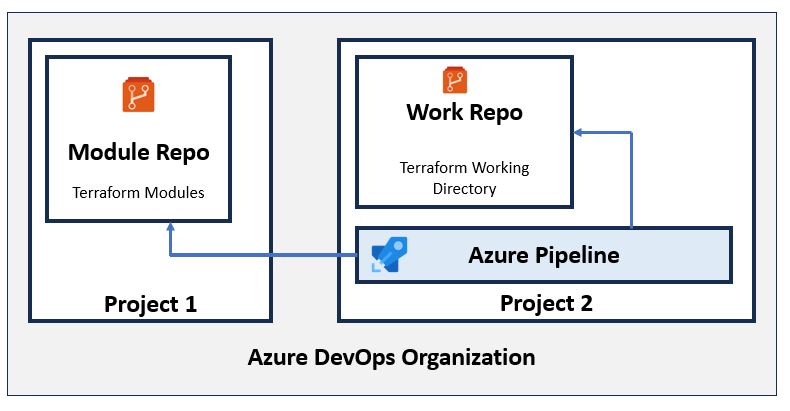
| Component | Description |
|---|---|
| ModuleRepo | A centralized repo storing Terraform modules |
| Project1 | Azure DevOps project where ModuleRepo resides |
| WorkRepo | Terraform working directory, containing main.tf, etc. |
| Project2 | Azure DevOps project containing WorkRepo |
| YourOrg | Your Azure DevOps organization name |
Goal: Call Terraform modules from Project1/ModuleRepo while running a pipeline in Project2/WorkRepo.
🚧 The Real Challenge
Azure DevOps does not allow pipelines to access resources in another project by default, even within the same organization.
So while Git operations within a single project work seamlessly, cross-project operations require a few critical configuration changes.
📦 Referencing a Terraform Module in Another Repo
module "network" {
  source = "git::https://dev.azure.com/YourOrg/Project1/_git/ModuleRepo//network?ref=main"
  vnet_name = "prod-vnet"
  address_space = ["10.1.0.0/16"]
}
Tip: For production, pin to a tag or commit hash rather than main.
Note:
- The
sourcepath format is the same whether the module is in the same project or a different one. - It is the access permissions and authentication mechanism that differs.
🔐 Understanding Git Authentication in Azure DevOps Pipelines
Can we use a Service Principal or Managed Identity?
❌ No. Azure Repos Git does not support Azure AD token-based authentication for Git operations. Even if permissions are assigned, Git clone/pull won’t work with a service principal or managed identity.
✅ Supported Git Authentication Methods
| Method | Works with Azure Repos Git? | Recommended for CI/CD |
|---|---|---|
| System.AccessToken | ✅ Yes | ✅ Best choice |
| Personal Access Token (PAT) | ✅ Yes | ⚠️ Acceptable fallback |
| SSH Key | ✅ Yes | Optional |
| Service Principal | ❌ No | ❌ |
| Managed Identity | ❌ No | ❌ |
System.AccessToken in pipelines for Git access. Use a service principal for Azure resource provisioning via Terraform.🛠️ Setting Up Cross-Project Access (Step-by-Step)
Important: If your pipeline and target repo are in the same project, most of the following steps are not required. Azure DevOps pipelines have implicit access to other repos in the same project.
If accessing a repo in a different project, follow these steps:
✅ Step 1: Disable Job Scope Restriction
In Project2 (where the pipeline runs):
-
- Go to Project Settings → Pipelines → Settings
- Uncheck “Limit job authorization scope to current project for non-release pipelines”
✅ Step 2: Grant Repo Read Permission
In Project1 → ModuleRepo:
-
- Go to Project Settings → Repositories → ModuleRepo → Security
- Add identity:
Project2 Build Service (Project2)orProject Collection Build Service (YourOrg)
- Set Read = Allow
Who knocks the door of the second repo?
It’s the pipeline job that runs terraform init, and inside that job, the Git client is invoked to fetch the module from the second repo (ModuleRepo). Git makes the network call, and it uses the System.AccessToken provided by the pipeline.
So, the actual access request comes from Git running inside the pipeline agent, and it is the pipeline identity that must be granted permission to the module repo.
✅ Step 3: Enable OAuth Token in Pipeline
-
- In your pipeline → agent job settings
- Check “Allow scripts to access OAuth token”
✅ Step 4: Configure Git in the Pipeline
steps:
- script: |
    git config --global url."https://$(System.AccessToken)@dev.azure.com".insteadOf "https://dev.azure.com"
  displayName: Setup Git Auth
  env:
    System_AccessToken: $(System.AccessToken)
What Does This Git Config Do?
| Line | Explanation |
|---|---|
git config ... |
Rewrites Git URLs to inject the token for auth |
System.AccessToken |
Holds OAuth token for current pipeline run |
env |
Injects token into Git command securely |
displayName |
Label for the step in the UI |
⚠️ Important: Never echo this token. It auto-expires after the pipeline run.
✅ Final Pipeline YAML Snippet
trigger:
- main

pool:
  vmImage: ubuntu-latest

steps:
- checkout: self

- script: |
    git config --global url."https://$(System.AccessToken)@dev.azure.com".insteadOf "https://dev.azure.com"
  displayName: Setup Git Auth
  env:
    System_AccessToken: $(System.AccessToken)

- task: TerraformCLI@0
  inputs:
    command: 'init'

- task: TerraformCLI@0
  inputs:
    command: 'apply'
    environmentServiceName: '<Azure Service Connection>'
🔁 Behavior Comparison
| Behavior | Same Project | Different Project |
|---|---|---|
| Git clone from another repo | ✅ Works out of the box | ❌ Needs configuration |
| System.AccessToken access | ✅ Auto-granted | ❌ Must uncheck job scope setting |
| Repo permissions needed | ❌ No | ✅ Yes |
| Service Principal usable for Git | ❌ No | ❌ No |
| Use OAuth token in Git config | ✅ Yes | ✅ Yes |
🔐 Understanding System.AccessToken: Lifecycle and Security
🧬 What Is It?
-
- Short-lived OAuth token generated by Azure DevOps
- Valid for the duration of the current pipeline
- Used for Git access and DevOps REST APIs
🕒 Token Lifecycle
| Aspect | Behavior |
|---|---|
| Created by | Azure DevOps at runtime |
| Expires | When pipeline completes |
| Scope | Current project or org (if enabled) |
| Stored? | ❌ Not retained |
✅ System.AccessToken is secure, ephemeral, and the preferred method for Git access in Azure DevOps pipelines.
Summary
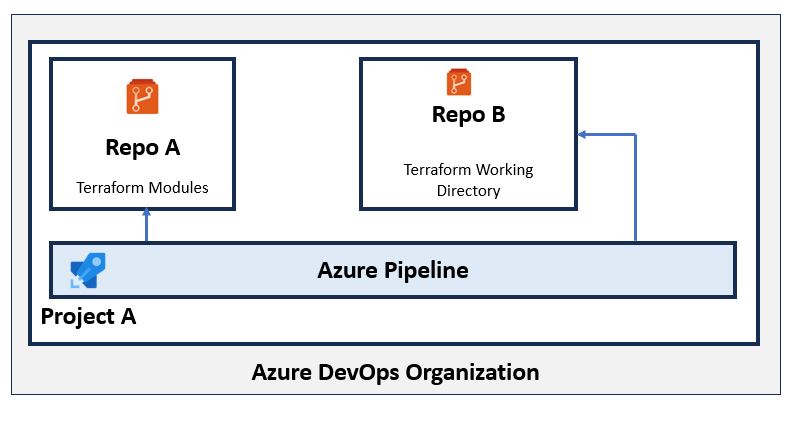
✅ Accessing Repos in the Same Project
-
-
Pipelines can access other repos in the same project by default.
-
No need to disable any settings or grant explicit permissions.
-
System.AccessTokenworks out of the box for Git operations. -
Use
checkout: noneand Git URL in module source if you don’t want automatic checkout. -
Still need to enable “Allow scripts to access OAuth token” in pipeline settings.
-
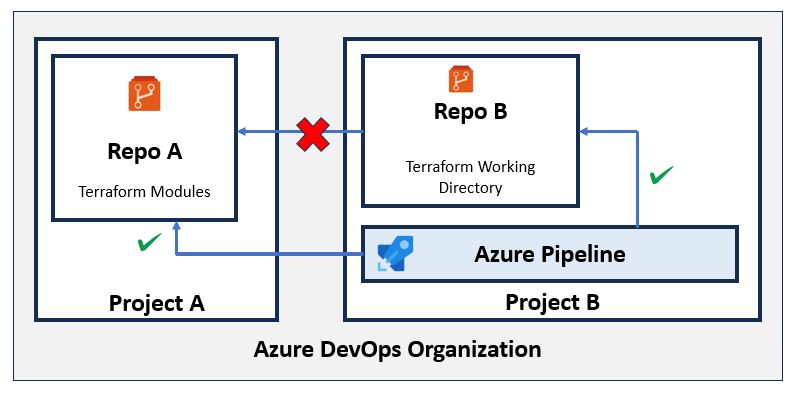
🔐 Accessing Repos in a Different Project
-
-
- Pipelines do not have access to repos in other projects by default.
- You must:
-
- Disable “Limit job authorization scope to current project” in the pipeline project settings.
- Grant Read permission on the target repo to the pipeline identity (e.g.,
Project2 Build ServiceorProject Collection Build Service).
-
- Enable “Allow scripts to access OAuth token” in the pipeline agent settings.
- Use
System.AccessTokenfor Git authentication by configuring Git:
-
git config --global url."https://$(System.AccessToken)@dev.azure.com".insteadOf "https://dev.azure.com"
- During
terraform init, Git will clone the module repo, and the pipeline identity must be authorized to access it.
 Subhro.blog