Modern applications are increasingly exposed over HTTPS to ensure secure communication between users and backend services. When deploying applications in Kubernetes using Istio Ingress Gateway, handling HTTPS requires a clear understanding of how certificates are configured, where they are stored, and how traffic flows through the system.
In this article, we will walk through the end-to-end flow of HTTPS traffic with Istio Ingress Gateway running on Azure Kubernetes Service (AKS), including how certificates are managed, how Azure Key Vault can be integrated, and how to ensure seamless certificate rotation without downtime.
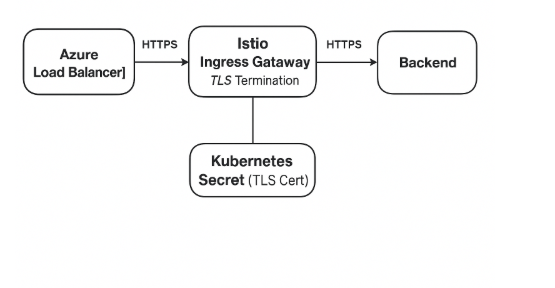
🔹 HTTPS Traffic Flow with Istio Ingress Gateway in AKS
📍 Step-by-Step Flow
1️⃣ Client → Azure Load Balancer (Public IP)
-
- DNS resolves
myapp.example.comto Azure Load Balancer Public IP. - Azure Load Balancer forwards HTTPS traffic to Kubernetes service of type LoadBalancer (istio-ingressgateway).
- No SSL termination here — Azure Load Balancer only forwards TCP (HTTPS) traffic.
- DNS resolves
2️⃣ Azure Load Balancer → Istio Ingress Gateway (Envoy Proxy)
-
- Traffic reaches the Istio Ingress Gateway pods (Envoy Proxy).
- Istio Gateway configuration uses
credentialNameto locate the certificate stored in Kubernetes Secret.
servers:
- port:
    number: 443
    name: https
    protocol: HTTPS
  hosts:
  - "myapp.example.com"
  tls:
    mode: SIMPLE
    credentialName: myapp-tls
-
- Envoy uses this certificate to perform TLS termination and decrypts the request.
3️⃣ Kubernetes Secret (Certificate Storage)
-
- Certificate and private key are stored in istio-system namespace as a Kubernetes Secret.
- Secret type →
kubernetes.io/tlscontainingtls.crtandtls.key. - Envoy dynamically loads this secret for HTTPS termination.
4️⃣ Istio Ingress Gateway → Backend Services
-
- Once HTTPS is terminated, traffic becomes plain HTTP (unless mTLS is enabled).
- VirtualService defines routing logic → forwards to backend pods or services.
- If mTLS is enabled → Gateway uses Istio mTLS to communicate securely with backend.
✅ Summary: Where is the Certificate Stored?
| Component | Role | Where is Certificate? |
|---|---|---|
| Azure Load Balancer | Forwarding only (TCP) | Certificate not stored here |
| Istio Ingress Gateway (Envoy) | TLS Termination | Uses Kubernetes Secret via credentialName |
| Kubernetes Secret (istio-system) | Actual certificate storage | Stores TLS cert and private key |
🔹 Using Azure Key Vault to Store Certificates for Istio Ingress Gateway
While Kubernetes Secrets are required by Istio Gateway, Azure Key Vault can be used as the secure source of truth for certificate management, versioning, and rotation. The Key Vault can be integrated with Kubernetes to sync certificates automatically or manually.
✅ Integration Methods
Option 1 — Sync Using CSI Secret Store Driver (Recommended)
Azure offers Secrets Store CSI driver with Azure Key Vault provider to mount secrets directly into pods. For Istio, this needs to be converted into a Kubernetes Secret so that credentialName can refer to it.
Flow: Azure Key Vault → CSI Driver → Mounted file → Kubernetes Secret → Istio Gateway
Option 2 — Manual or Scheduled Sync
Manual syncing using CLI or automation pipelines:
az keyvault secret download --vault-name MyKeyVault --name myapp-tls-cert --file tls.crt
az keyvault secret download --vault-name MyKeyVault --name myapp-tls-key --file tls.key

kubectl create secret tls myapp-tls --cert=tls.crt --key=tls.key -n istio-system --dry-run=client -o yaml | kubectl apply -f -
Note: This requires running again after certificate renewal.
Option 3 — cert-manager + Azure Key Vault Issuer (Recommended for Production)
Using cert-manager with Azure Key Vault Issuer automates certificate retrieval and renewal:
apiVersion: cert-manager.io/v1
kind: Certificate
metadata:
  name: myapp-cert
spec:
  secretName: myapp-tls
  issuerRef:
    name: akv-issuer
    kind: ClusterIssuer
  dnsNames:
  - myapp.example.com
cert-manager pulls the cert from Key Vault and creates/updates Kubernetes Secret automatically.
📌 Auto Rotation of Certificates
Azure Key Vault supports automatic rotation of certificates through its certificate policies. However, when certificates are rotated in Key Vault, the updated certificate will not automatically reflect in Istio Gateway unless you integrate with tools like cert-manager or build custom automation to sync the latest certificate into Kubernetes Secret.
For production environments, Option 3 (cert-manager + Azure Key Vault) is recommended because it supports automated sync + secret refresh + TLS reload in Envoy without downtime. Manual methods should be avoided in production due to risk of outages if not updated on time.
🚨 Key Points
-
- Istio Gateway must have the certificate as Kubernetes Secret via
credentialName. - Azure Key Vault provides secure storage and lifecycle management.
- For auto-sync → use cert-manager → seamless rotation and renewal.
- Manual sync is possible but should not be preferred in production environments.
- Istio Gateway must have the certificate as Kubernetes Secret via
✅ Summary
| Where | Supported | How |
|---|---|---|
| Azure Key Vault (only) | ❌ No direct support in Istio Gateway | Requires sync to Kubernetes Secret |
| Azure Key Vault + CSI or cert-manager | ✅ Yes | Recommended and automated |
| Kubernetes Secret only | ✅ Yes | Default and simplest approach |
✅ Conclusion
Handling HTTPS in Istio Ingress Gateway requires careful management of TLS certificates. While Kubernetes Secrets are mandatory for Istio, using Azure Key Vault enhances security and allows for streamlined certificate lifecycle management.
To avoid outages and ensure certificates are always valid, it is highly recommended to integrate with cert-manager for automatic synchronization and renewal. This ensures that certificate expiry never disrupts your applications and aligns with enterprise-grade best practices.
 Subhro.blog