Azure ExpressRoute provides a private, reliable connection between your on-premises infrastructure and Azure, bypassing the public internet for superior performance and security.
But with several SKUs available, how do you choose the right one for your needs? Let’s break it down.
SKU Comparison : Local, Standard and Premium
ExpressRoute Local: Ideal for organizations with region-specific workloads, Local offers cost-effective, high-speed connectivity but restricts access to Azure services within the same region. If you’re running everything within one region, this is your low-cost winner.
ExpressRoute Standard: Need a bit more flexibility? Standard allows you to connect to Azure services across multiple regions within the same geopolitical area. It’s perfect for businesses operating within a specific region but wanting the freedom to move across multiple Azure regions, like different US or European datacenters.
ExpressRoute Premium: If your business is global, Premium is your go-to. It extends your Azure connectivity across geopolitical boundaries, allowing seamless access to services and VNets globally.
ExpressRoute Direct : High-Throughput Dedicated Connections
While ExpressRoute Direct is not a SKU, it provides dedicated physical ports (up to 100 Gbps) to Azure’s backbone network. ExpressRoute Direct is essential for organizations requiring very high bandwidth and greater control over their connections.
However, you must still choose a SKU (Standard, or Premium) when configuring ExpressRoute Direct:
Pairing ExpressRoute Direct with Standard provides high-bandwidth connectivity within a geopolitical region.
Pairing ExpressRoute Direct with Premium extends this capability globally, with additional features such as global VNet Peering and increased route limits.
ExpressRoute Direct can only be combined with Standard or Premium, not with Local.
ExpressRoute Built-In Redundancy : Ensuring High Availability
All ExpressRoute SKUs (Local, Standard, Premium) offer built-in redundancy through dual physical connections to Microsoft’s network. These connections ensure high availability by providing automatic failover between the two paths.
ExpressRoute Local, Standard, Premium: All include dual connections to two routers in the Azure region, ensuring network-level redundancy.
ExpressRoute Direct: Provides even higher redundancy with dual dedicated physical ports at different Microsoft facilities, offering geographic redundancy in addition to network redundancy.
This built-in redundancy ensures automatic failover and high availability, minimizing downtime for critical workloads.
VNet Peering : Connecting Networks Across Regions
When it comes to Global VNet Peering, not all ExpressRoute SKUs are created equal:
Standard and Local SKUs: You can peer VNets globally, but traffic between these VNets travels over the Microsoft backbone, not your ExpressRoute circuit, and incurs VNet Peering costs.
Premium SKU: Unlocks support for global VNet Peering over the ExpressRoute circuit, offering low-latency and private connections between peered VNets across different regions — ideal for globally distributed workloads.
This makes Premium essential when you require cross-region communication through a secure and private connection.
Global Reach : Connecting On-Premises Locations Globally
Global Reach is a feature available with ExpressRoute Standard and Premium, allowing you to connect multiple on-premises locations through the Microsoft global backbone. This is especially useful for multinational organizations that need to connect their offices or datacenters across continents with low-latency and high-security.
ExpressRoute Direct can leverage Global Reach when paired with Standard or Premium SKUs, enabling high-throughput, private connections between your global on-premises locations.
Note that ExpressRoute Local does not support Global Reach, as it is designed for region-specific use cases.
FastPath : Turbocharging Your Connections
FastPath improves performance by bypassing the ExpressRoute gateway for direct communication between on-premises devices and Azure Virtual Networks. This feature is available with ExpressRoute Standard and Premium SKUs and is a must-have if you want to minimize latency and reduce the hops in your network path.
However, FastPath doesn’t support VNet peering, so it’s most beneficial for high-speed connections directly to Azure VNets. In cases where you need cross-region VNet peering, consider combining Premium with the performance benefits of FastPath.
BGP (Route) Advertising : Flexibility in Network Control
Azure ExpressRoute uses BGP (Border Gateway Protocol) for routing between your on-premises network and Azure, providing dynamic and flexible route exchange. Key considerations include:
Dynamic Route Updates: With BGP, route advertisements between your network and Azure are automatically updated, allowing for flexible routing policies.
Traffic Segmentation: You can control which on-premises routes are advertised to Azure and vice versa, ensuring that only the desired traffic flows through your ExpressRoute connection.
Routing Limits: Standard SKU has limitations on the number of routes that can be advertised. Premium SKU extends the route limits, making it a better fit for complex, large-scale networks.
This flexibility is essential for organizations that need fine-grained control over how their traffic flows between their on-premises and Azure environments.
Integration with Azure Virtual WAN : Expanding the Horizon
When combined with Azure Virtual WAN, ExpressRoute becomes a powerful tool for simplifying and centralizing global network management:
Centralized Hub: With Azure vWAN, you can create a unified global network by connecting your ExpressRoute circuits to a central hub, allowing all your branches, data centers, and Azure regions to communicate efficiently.
Simplified Routing: Azure vWAN automates the management of complex routing configurations, ensuring that your on-premises locations and Azure VNets are always optimally connected.
ExpressRoute Integration: Integration with Azure vWAN supports high-throughput connections, especially when using ExpressRoute Direct for dedicated bandwidth.
This makes Azure vWAN + ExpressRoute a great solution for enterprises looking to manage large-scale global networks with ease.
Co-existence of ExpressRoute and Site-to-Site (S2S) VPN : Failover and Precedence
In many enterprise environments, ExpressRoute and Site-to-Site (S2S) VPN are used together to ensure connectivity to Azure. However, it’s essential to understand which connection takes precedence and how they can work together:
Precedence: By default, Azure traffic will prioritize ExpressRoute over S2S VPN. This is because ExpressRoute provides a dedicated, private connection that offers better performance, lower latency, and higher security than a VPN tunnel over the public internet.
S2S VPN as Failover: A S2S VPN connection can act as a backup if your ExpressRoute connection fails. You can configure your environment to automatically fail over to the VPN in case of a disruption in the ExpressRoute circuit, ensuring uninterrupted access to Azure services. Once ExpressRoute is restored, traffic will again route through the ExpressRoute connection.
This co-existence provides a robust disaster recovery option, allowing organizations to maintain continuous connectivity even during unexpected outages.
Use Cases
- Region-Specific Workloads: For workloads confined to a single Azure region, ExpressRoute Local offers the best cost-performance balance. It’s perfect for businesses with stringent cost constraints but high-speed requirements.
- Regional Multinational: If your organization operates in one region but across multiple datacenters, ExpressRoute Standard is a solid choice, providing flexibility across multiple Azure regions within the same geopolitical area.
- Global Operations: For organizations with a global footprint, ExpressRoute Premium is essential, allowing you to seamlessly access Azure services and connect VNets across regions.
- High Throughput Needs: For mission-critical workloads requiring massive data transfer, ExpressRoute Direct offers the highest bandwidth, with the flexibility to combine with Standard or Premium for regional or global coverage.
ExpressRoute Gateways: Performance and Scalability Options
Choosing the right ExpressRoute Gateway is crucial for optimizing your Azure connectivity, as each gateway SKU offers different performance levels and redundancy options. Below is a comparison of the available SKUs :
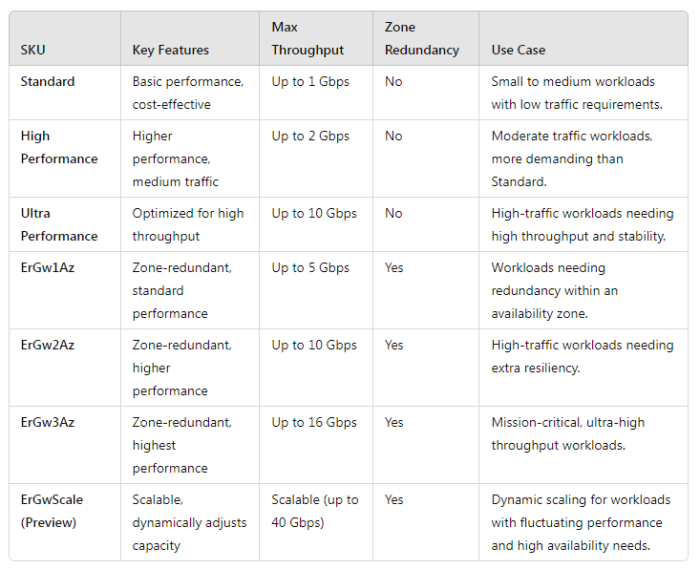
Standard, High Performance, Ultra Performance: Offer increasing levels of throughput, suitable for workloads of varying traffic volumes, but without zone redundancy.
ErGw1Az, ErGw2Az, ErGw3Az: Provide zone redundancy, ensuring high availability by being distributed across Availability Zones.
ErGwScale (Preview): Scalable performance (up to 40 Gbps) with automatic adjustments, ideal for fluctuating workloads that demand dynamic scaling and high availability.
Selecting the right gateway depends on your workload’s performance requirements and the need for redundancy and scalability.
Conclusion
In conclusion, choosing the right ExpressRoute SKU depends on your business needs — whether you’re working locally, regionally, or globally, and how much performance you need.
By understanding the capabilities of each SKU, including VNet Peering, Global Reach, FastPath, BGP advertising, and Azure vWAN integration, you can ensure you’re making the best decision for your Azure connectivity.
 Subhro.blog