Introduction
When you start using Terraform in a test or POC environment, you can start with a single folder which contains your code, variables, environmental variables and all other required components. However, this approach would not work for a large scale deployment.
If you are planning to deploy your organization’s infrastructure or client infrastructure using Terraform , you need to create a strategy first. To create a strategy, you need to consider some best practices which can be incorporated in your Terraform architecture.
In this article, we will discuss some of the best practices and important points, which can be considered and adopted during the creation of Terraform architecture.
It is important to understand that there is no absolute right or wrong approach in this case. What works best for one environment may not be suitable for another environment.
You can use this article as a reference document when you are designing your Terraform structure and strategies. We recommend you to refer more articles, Hashicorp documentation and finally design your own. In short, do your own research and do not use this article as a single source of truth.
Terraform State File
One of the most critical components of Terraform is its’s state file. The state file acts like a database for Terraform.
If there is any component which is present in the target environment, but not in the state file, then Terraform does not know about its existence. Similarly, if any component is there in the state file but not there in the target environment, then Terraform will create it in the next execution.
Let’s assume you have created a code for Azure VM deployment, and you have deployed a VM name VM1. Next time, you want to deploy another VM named VM2, and you just modified the VM name from VM1 to VM2 in the same code and apply the code. If you do so, it will delete VM1 and create VM2. So if you want to keep VM1 intact and add another VM, you should not modify any code or parameter related to VM1.
We are trying to summarize some of the best practices related to the state file.
• When you are deploying and managing an environment through Terraform, do not use any other code or method to manage the same environment. Use only Terraform. For example, you have deployed an Azure VNet using Terraform. Now you are adding a subnet manually (or through PowerShell) to that Azure VNet. If you do so, Terraform state file will not be updated, and next time when you execute Terraform this subnet will be deleted.
• If there is any component which is not deployed through Terraform, use terraform import feature to import that component into Terraform state file. You can refer this article for Terraform import.
• Do not create a single large state file for your entire environment. Always try to break the state file into smaller pieces. In other word, a single terraform state file should not cover a large portion of your infrastructure. The approach would reduce the damage that might occur due to any error in handling the state file.
• Never share a single state file between multiple environments. A state file for development environment should never be shared with production.
• If possible, use separate state file for each component. For example, you have an application called PowerBI, and you are deploying few VMs for that application. So create a state file called powerbi_vms.tfstate. This state file will only contain information on PowerBI VMs.
• Avoid using local state file. Use remote state file. You can refer this article for configuring remote state file for Terraform using Azure Storage Account.
• We suggest to create a global variable folder, where you can define the location of backend Storage Account and container details where remote state files will be stored. use separate Storage Account or Container for each environment. refer that global variable folder in each code, so that each code is aware about remote state file location. You just have to mention the state file name for each component, which will be stored in the appropriate storage account.
Security Best Practices
This is again a broad topic and there is no universal strategy to comply with security, but let’s discuss some generic guidelines.
• Terraform needs to refer some environment variables, which includes Subscription ID, tenant ID, Client ID and Client Secrets. In addition, you might need to use some sensitive information in the code like Admin username, Admin Password. All these information are considered as sensitive information for an organization, and should never be exposed outside the organization.
• Avoid storing any sensitive information in terraform code. Store these secrets in a secure device like Azure Key Vault or Amazon KMS.
• In case you are storing any sensitive information in your local .tfvars file, make sure they are ignored while check in the code to any repo. Use .gitignore files for this purpose.
• You can also exclude .terraform directory and .tfstate files while check in your code to repo.
Leverage Terraform Module
While configuring Terraform for a large environment, always take the modular approach.
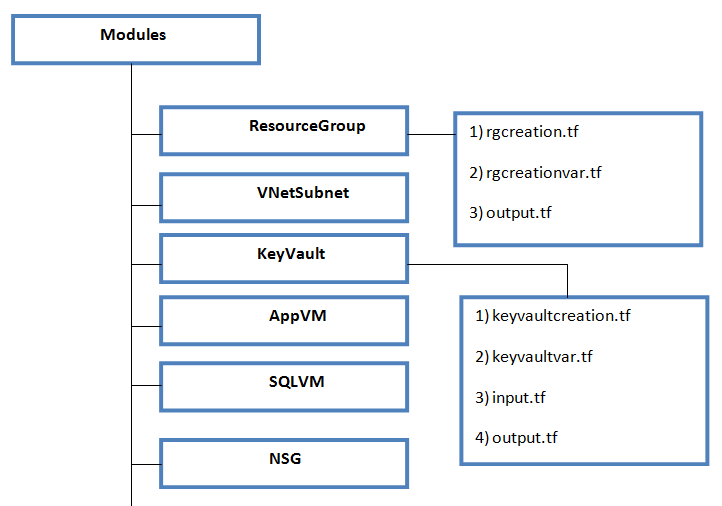
• Create separate module for each infrastructure component. For example, if you are going to build an Azure Foundation through terraform code, use separate modules for Azure VM, Azure Network, Azure Key Vault, Azure VM and so on. Name each module folder matching with corresponding infrastructure component.
• Do not club multiple infrastructure components in one module, as this will make it difficult to re-use. For example, do not make a single module which will deploy Azure resource Group, Network, Key Vault, Storage Account and Azure VMs.
• Always use variables within a module, do not ever hard code any value. The values for these variables will be supplied by resource folder, which we will discuss in the upcoming section.
• Under each module folder, create separate files for the resource deployment code, input variables and output variables. This will help you easy to understand what variables are passed as an input and what variables are exported to other modules as output.
• Do not create separate module folder for each environment, rather share module folders between multiple environments. This will help you to manage your code well in the long run. For example, in future if you want to modify your key vault code, you have to modify one single code which is in the Key Vault module.
• Avoid nested modules, as they will make the structure complicated. Hashicorp does not recommend nested modules unless it is necessary.
• A variable name must be unique within an entire module.
• You do not need to define the state file location in Module folders. You will define state files in resource folders.
Below diagram will summarize the modular approach that we have discussed.
Use Resource Folder
In the previous section, we have discussed the structure of Terraform Module folders. In this section, we will talk about resource folders.
• The resource folders are those folders which will be used for actual resource deployment. This folder will store necessary variables , state file and location of the module folder which it is going to use for resource deployment.
• Ideally, there should be a master folder for each environment (Ex: Prod, Pre-Prod, Dev) an under that there should be a folder called resource. Under that resource folder, there should be subfolders for each component.
• Each folder should contain variable file, state file location and source module folder. The code will be deployed using the corresponding module using variables which are defined in this folder.
• There are some values which might remain same for the entire environment. For example; target region, environment variables, backend configuration etc. We recommend to use a Global variable folder for each environment. All these common variables will be supplied from this folder.
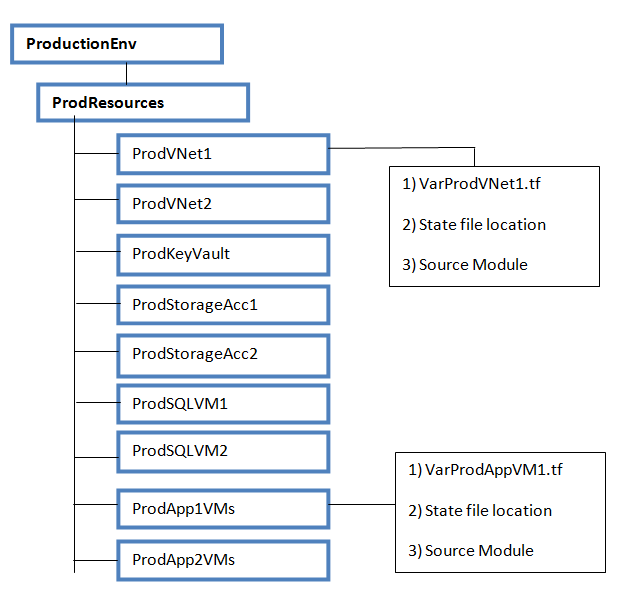
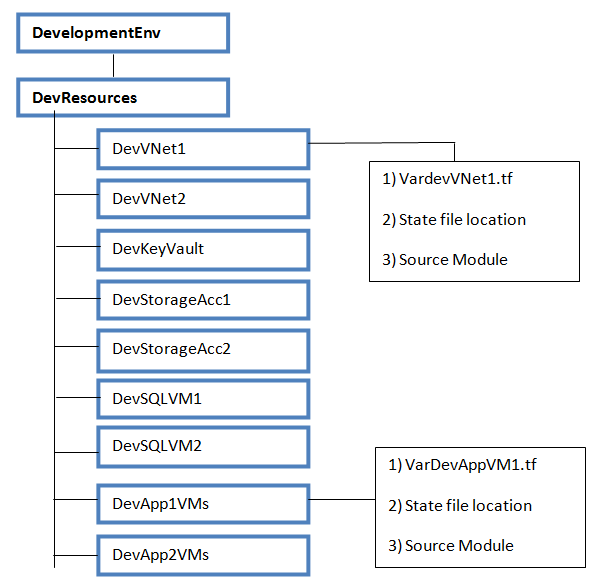
Below two diagrams will give you an idea on what we have discussed just now. We have created two master folders for two different environment : 1) ProductionEnv 2) DevelopmentENV.
• Each folder contain respective resource folder.
• Under resource folder, we have subfolders for each components. For example, we have created 2 Azure VNets in Production environment 1) ProdVNet1 2) ProdvNet2, so we have created subfolders for each.
• Each component level folder contains a variable file, state file location and source modules details.
• In future, if you decide to create another VNet, you will copy the ProdVNet2 folder, change variables, change state file location and execute it. Do not make any modification on ProdVNet1 or ProdvNet2 folders.
Deploy Terraform through DevOps
You can deploy Terraform code through Visual Studio code or using any other tool. However, for a large environment we strongly recommend to deploy Terraform through DevOps.
This approach has several benefits, and some of the key benefits are as follows :
1) You can store your code within a Git based repository , for example Azure Repo. This will offer you features like version controlling, branching, access control and protecting your code.
2) You can standardize the deployment process through pipeline. Once you configure pipeline, you can control the pipeline trigger, pre-deployment approval and many other components.
We have published a separate article for Terraform deployment through Azure DevOps, where we have covered some best practices.
In general, when you start using DevOps with terraform, you can follow below guidelines :
1) You can consider using dedicated repository for each environment. For example, you can code the ProductionEnv folder in one repo, and DevEnv folder in another repo. Also, you can store modules in a separate repo which will be used by all environments. This approach will give you better control on who can access and modify which part of the code.
2) Always protect the master branch of your repo. Any change in the code will first be committed to a child branch, which will create a pull request. once the change is reviewed and approved by admins, it will be merged with master.
3) Similarly, protect each stage of your release (deployment) pipeline with pre-deployment approval. This will ensure that no deployment would be triggered accidentally.
4) Build your pipeline in such a way, that you get a chance to review the output of Terraform Plan, before it goes to Terraform Apply. This is one of the most critical points which should never be missed. Before you hit Terraform Apply, you must know what changes would occur in the environment. Please refer this article for details.
Summary
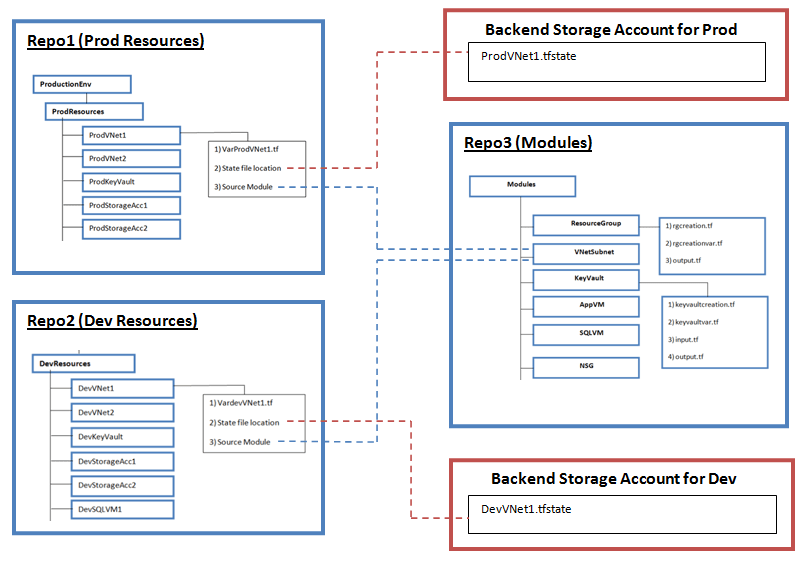
Below diagram provides a visual representation of the points that we have covered in this article.
As you can see, we have used three Repos. Repo1 contains code for Prod environment, Repo2 contains code for Development environment. Repo3 contains all module folders, which will be used by Repo1 and Repo2.
We have used separate storage account for Prod and Dev environment backend configuration. As discussed before, there will be separate state file for each component.
Each repo will also contain a .gitignore file, which is not shown in the diagram.
Finally, we would like to remind you that the best practices and Terraform architecture that we have discussed in this article are only for reference purpose. You can use this information to create your own Terraform architecture and strategies, which might be different from the one that we have covered.
 Subhro.blog